
You’ve decided to move, upgrade, or store your desk—but it won’t fit through the door. Don’t panic. Most desks are designed to be taken apart, even if they look permanently built. Whether you’re dealing with a flat-pack IKEA model, a vintage oak workhorse, or an electric sit-stand workstation, the right approach makes disassembly fast, safe, and reassembly-ready.
The key? Knowing what kind of fasteners hold it together and where hidden hardware hides. From cam locks to concealed nails, this guide walks you through every step, no guesswork, no damage. You’ll learn how to identify joinery types, use the correct tools, avoid common mistakes, and keep everything organized for smooth reassembly later.
Assess Your Desk Type Before Starting
Before grabbing a screwdriver, pause and inspect. Your desk’s construction determines how it comes apart and how easily you can do it.
Identify Flat-Pack vs. Solid Wood Construction
Flat-pack desks from IKEA, Sauder, or Eureka Ergonomic use engineered connectors like cam locks and dowels. These are meant for tool-free assembly and disassembly. Look for large Phillips-head screws with circular bases, arrows or notches on screw heads, and particleboard or MDF material.
Solid wood desks, especially antiques or university surplus pieces, often rely on dado joints, dowels, nails, or mortise-and-tenon joinery. These may have been glued, making separation trickier. Signs include seamless joints with no visible screws and resistance after removing visible fasteners.
Locate Hidden Fasteners Early
Many people fail at disassembly because they miss what’s not obvious. Check these spots regularly:
- Under the top edge of the desk
- Inside drawer cavities
- Behind trim or leveling feet
- Beneath the modesty panel at the back
One user spent hours trying to remove a Hechman-style oak desk top, only to find four hidden finishing nails holding it in place after all screws were out.
Gather the Right Tools First
Using the wrong tool can strip screws, crack particleboard, or scratch finishes. Prepare a simple kit based on your desk type.
Essential Tools for Any Desk Disassembly
You need a Phillips screwdriver with a magnetic tip to remove standard and cam-lock screws. A 5mm hex key (Allen wrench) operates cam locks requiring hex drive. A rubber mallet gently shocks joints loose without causing damage. Use a flashlight to spot hidden fasteners in dark corners. A utility knife scores glued seams to prevent splitting. A small padded pry bar removes nailed back panels safely. Pliers extract drawer pegs or stuck fasteners. Painter’s tape and marker label parts and screw locations. Small bags keep screws grouped by location.
For one-time use, a $10 screwdriver and $6 hex key are enough. Skip expensive sets unless you plan more DIY projects.
Unlock Cam Locks the Correct Way
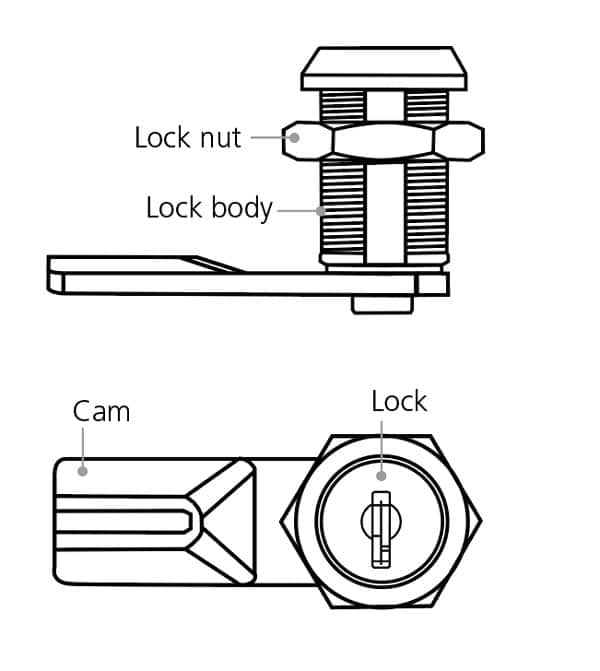
Most modern desks use cam lock systems, and misunderstanding them causes the biggest disassembly failures.
How Cam Lock Mechanisms Work
Cam locks consist of a cam bolt (rotating nut) with a slotted or Phillips head and a dowel pin that aligns two panels. When the cam is turned toward the joint, it clamps the dowel and locks the pieces together.
Rotate, Don’t Remove
The critical mistake is unscrewing cam bolts completely. Instead, insert your Phillips screwdriver or 5mm hex key. Turn 90 degrees counter-clockwise (a quarter turn). Watch the arrow or notch—when it points away from the joint, it’s unlocked. The panels should now separate with light pressure.
Do not unscrew the cam completely. Stop at a quarter turn. If panels still won’t budge, check for additional fasteners or glued joints.
Remove Drawers and Internal Components First
Drawers block access to internal screws and fasteners. Remove them early in the process.
Safely Extract Drawer Units
Pull the drawer fully open. Look for metal clips, stops, or pegs on the slide rails. Lift the front slightly and pull straight out. Check inside the cavity because some cam screws or mounting brackets hide behind them.
Handle drawer pegs and locks carefully. Travel-limiting pegs on drawer bottoms prevent over-extension. Remove these with pliers if needed. Locking mechanisms may prevent removal even when unlocked. One user found a drawer wouldn’t come out until a pencil mark shortened its travel, freeing the lock.
Separate Panels Using Gentle Pressure
Once fasteners are unlocked or removed, separate components without using force.
Push, Don’t Pry
Lay the desk upside down on a moving blanket. Apply even pressure to both ends of the joint. Use a rubber mallet to tap seams lightly. This shocks glued or tight joints loose.
Never use a metal pry bar directly on wood or laminate. Wrap the tip in cloth or use a plastic spudger to prevent surface damage.
Handle Glued Joints Properly
If the joint resists after screw removal, score the seam with a utility knife to prevent tear-out. Tap gently with a mallet. Work slowly because sudden force can split wood or shatter particleboard.
Remove Back Panels to Access Hidden Parts
On rolltop, secretary, or multi-section desks, the back panel often hides critical fasteners.
Why Back Panel Removal Matters
Back panels are made of thin plywood or veneer and held by nails or staples. You must remove the back panel to access tambour mechanisms (rolltop desks), internal screws for lower sections, and dado-mounted shelves and dividers.
To remove a nailed back panel, use a padded pry bar or putty knife wrapped in cloth. Start at the top and work down. Gently lift nails one at a time. Support the panel to prevent cracking.
Handle Solid Wood Desks with Hidden Nails

Vintage or heavy-duty desks often combine screws with finishing nails or glue.
Case Study: Hechman-Style Oak Desk
Nine visible screws secured the top. One hidden screw was found under the front edge. Still, the top wouldn’t lift. The culprit was four finishing nails in the dado joint.
To remove stubborn nails, try a nail punch first. If heads are recessed or broken, use a 3/8-inch drill bit as a drift punch. Drive it through the existing hole to push the nail through. The bit may overheat, so stop and cool it if needed. The panel separated without splitting the wood.
Disassemble Electric Sit-Stand Desks Safely
Motorized desks require extra care, especially with wiring.
Power Down Before Starting
Unplug completely. Follow UL 962 safety standards and never handle electrical parts while powered. Take photos of wiring connections before disconnecting anything.
Remove the Desktop Carefully
Detach the control box and label all wires. Unscrew the desktop from the motor frame. Lift the desktop off and carry it on its long edge to prevent bowing. Use moving blankets because they breathe, reduce micro-scratches, and protect sintered stone or glass tops.
Pack and Label Everything for Reassembly
Disassembly is only half the job. If you can’t put it back together, you’ve failed.
Label Every Part and Screw
Use painter’s tape and a marker to label left vs. right legs, top vs. base, and drawer positions. Store screws in small bags labeled by location (e.g., “Left Side Cam Locks”). Use zip ties to bundle leg pairs together and keep cables separate.
A visual reference saves 20 minutes of “where does this go?” frustration later.
Avoid These Common Disassembly Mistakes
Even experienced DIYers make these errors. Don’t repeat them.
Forcing cam screws past 90 degrees strips cams and damages particleboard. Stop when resistance increases because it only needs a quarter turn. Prying panels apart chips edges and cracks surfaces. Tap with a rubber mallet instead. Not removing the back panel first leaves tambour mechanisms stuck. Always check if the back is removable, especially on rolltops. Transporting the desktop flat causes cracking and warping. Carry it on its long edge, padded with moving blankets.
Reassemble with Confidence
Follow the reverse order of disassembly. Attach legs or frame first. Reinstall drawers. Secure the top. Reconnect electrical systems last.
Tighten bolts to 5–7 Newton-meters (firm “snug” torque) to prevent wobble and long-term fatigue. Use minimal glue for future access. If reapplying glue on a dado joint, use sparingly so you can disassemble later without damage.
Frequently Asked Questions About Taking Apart a Desk
Can all desks be taken apart?
Most desks are designed to be disassembled. Flat-pack desks use cam locks and dowels specifically for this purpose. Solid wood desks may have hidden nails or glue, requiring more effort. Electric desks need extra care with wiring but are generally serviceable.
What happens if I force a cam lock screw?
Forcing cam screws past 90 degrees strips the mechanism and damages the particleboard. Cam locks only need a quarter turn counter-clockwise to release. Stop when you feel resistance.
How do I know if my desk has hidden fasteners?
Check under the top edge, inside drawer cavities, behind modesty panels, and beneath leveling feet. If the desk won’t separate after removing visible screws, hidden nails or glue are likely the cause.
Should I use glue when reassembling my desk?
Use minimal glue during reassembly. This allows future disassembly without damaging the wood. A “snug” fit with original hardware provides sufficient stability for most uses.
Can I saw my desk apart if it won’t fit?
Never saw a desk apart, especially particleboard. It won’t go back together cleanly, and cutting destroys structural integrity. Disassembly is always the safer option.
Key Takeaways for Successfully Taking Apart Your Desk
Most desks are designed for disassembly. Look for cam locks, arrows on fasteners, and hidden hardware. Always inspect thoroughly before applying force. Use the right tools: a quarter turn unlocks cam locks, not full removal.
Document everything with photos and labels before disassembly. Keep screws organized by location. Use moving blankets to protect surfaces during transport. Carry desktops on their long edge to prevent damage.
When you know your desk can be packed away in minutes, you feel a sense of lightness. You aren’t tethered to a space. You are the architect of your environment, wherever you go.





