
You’re typing, focused on your work, and every keystroke sends a ripple through your monitor. The screen wobbles. It’s distracting, annoying, and surprisingly common. If you’ve ever asked, “Why does my monitor shake when I type?” — you’re not alone. The culprit isn’t a faulty display, but mechanical vibration transfer from your desk, keyboard, or even your chair. This guide gives you proven, step-by-step solutions to eliminate monitor shake, no guesswork, no myths, just results.
From reinforcing flimsy desks to using wall mounts and ergonomic tweaks, we cover every fix, ranked by effectiveness. Whether you’re on a budget, renting, gaming, or working from home, there’s a solution that fits your setup.
Diagnose the Source of Wobble
Before fixing, identify what is actually causing the shake. Monitor movement stems from vibration transmission, not the monitor itself.
Test Your Desk Stability
Tap the edge of your desk firmly. If the monitor sways, the desk is flexing. Use a glass of water as a vibration detector. Ripples mean poor damping. This confirms the structure lacks rigidity.
Isolate the Input Source
Try typing with your keyboard on your lap. If the monitor stops shaking, the force comes through the desk. If it still wobbles, check the monitor base or arm.
Check Mounting Hardware
Inspect all screws on the monitor base, arm clamps, and VESA mounts. Loose bolts are a common, overlooked cause. Tighten them with an Allen key. Many users report immediate improvement after this single step.
Reinforce Your Desk Structure

A shaky desk is the number one cause of monitor wobble. Even high-end monitors cannot compensate for a weak foundation.
Upgrade to a Sturdy Desk
Replace flimsy particleboard or glass desks with solid wood at least 1.5 inches thick or steel-framed models. Top picks include Uplift V2, Flexispot E7, and Desk House Apex. Four-leg designs with cross-bracing resist torsion far better than two-pole standing desks.
Avoid narrow, wheeled, or glass-top desks unless reinforced.
Add Steel Bracing
For existing desks, install L-brackets and flat steel plates at leg-to-top joints. Use machine screws for metal frames or wood screws for particleboard. Reinforce mid-span with a wooden crossbeam or custom steel frame underneath.
This can reduce vibration by 50 to 70 percent, especially on long desks.
Secure or Remove Wheels
Lockable casters still allow micro-movement. For maximum stability, replace wheels with fixed legs or use rubber leveling feet to eliminate rolling. This small change increases contact friction and reduces sway.
Dampen Internal Resonance
Hollow desks act like drums, amplifying vibrations. Apply adhesive damping pads to the underside. These absorb sound waves and reduce flex. For budget options, foam insulation sheets or thick rubber mats work surprisingly well.
Upgrade Your Monitor Support System
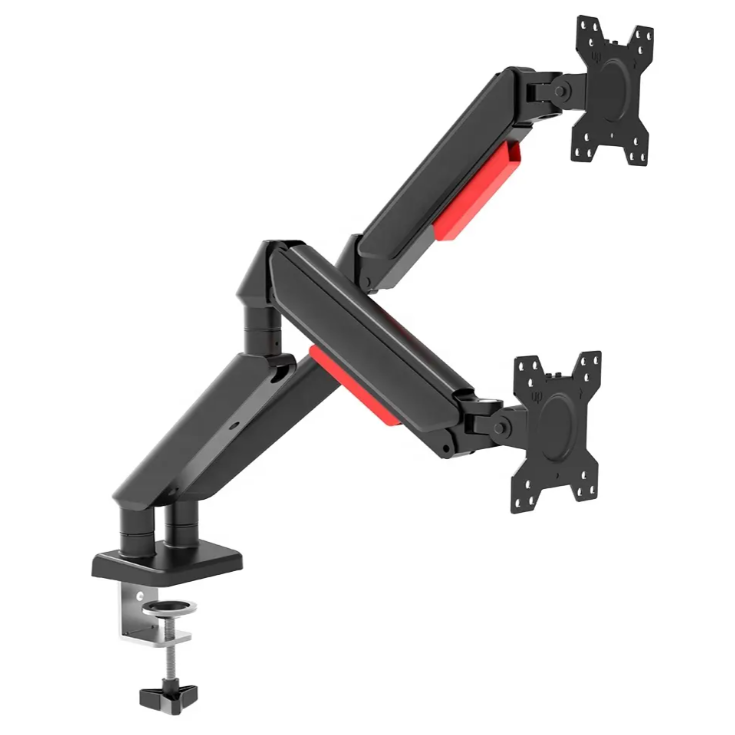
Your monitor’s base or arm can make wobble worse or eliminate it.
Replace OEM Stand with Heavy-Duty Base
Most stock stands are narrow and lightweight, acting like springs. Upgrade to a wide, steel-based stand like the Hamudu Heavy-Duty Monitor Stand. It supports up to 32-inch monitors, has a wide footprint that resists tipping, and reduces visible shake by over 80 percent compared to OEM stands.
This is one of the most effective non-permanent fixes.
Use a Monitor Arm With Caution
Monitor arms improve ergonomics but can worsen shake if the desk is unstable. The longer the arm, the more leverage and sensitivity to desk flex.
Choose the right mount. Dual clamps distribute weight better than single clamps. Grommet mounts through desk holes are stiffer than edge clamps. Tighten all pivot points with Allen keys. Loose joints amplify sway.
Avoid dual-monitor arms on weak desks. They double the stress.
Recommended arms include North Bayou F80 for budget-friendly use and Humanscale Float for premium self-balancing performance.
Mount Monitor to the Wall Definitive Fix
Wall mounting is the only 100 percent effective solution for eliminating desk-based vibration.
Why It Works
This breaks the vibration chain. The monitor no longer touches the desk. There is no leverage amplification from arms or bases. It is ideal for permanent home offices.
Installation Steps
- Locate wall studs using a stud finder.
- Use a VESA-compatible bracket like VIVO or Mount-It MI-2345.
- Drill directly into studs for maximum hold.
- For hollow walls, use toggle bolts or chemical anchors.
Never mount on drywall alone. It is a safety risk.
Best wall mounts include Ergotron LX for full-motion ultra-stable use, Humanscale Float Wall Version for elegant self-balancing, and VIVO Single Monitor Wall Mount for affordable reliability.
Dampen Vibration at the Monitor
Even on a shaky desk, you can isolate the monitor from movement.
Use Anti-Vibration Pads
Place high-density rubber, neoprene, or sorbothane pads under the monitor base or arm clamp.
Top picks include Sorbothane Isolation Pads for best damping performance, 3M Non-Slip Cushion Pad for affordable grippy use, Gumax Silicone Desk Mat for thick weighted anti-slip use, and Elgato Desk Mat for large added mass and stability.
Avoid thin felt pads. They do nothing.
Try the Paper Towel Roll Hack
A viral DIY fix involves cutting a paper towel roll in half and placing it under each side of the monitor base. This raises the monitor slightly and acts as a soft stabilizer. Users report no wobble anymore after trying this.
Add Counterweights
Increase inertia behind the monitor by stacking printer paper, heavy books, or custom steel blocks. More mass means less movement. This is a proven office trick. It is simple, free, and effective.
Reduce Vibration at the Source
Stop the shake before it starts by minimizing input forces.
Use a Detached Keyboard Tray
Mount a floating under-desk tray for your keyboard and mouse. This isolates typing force from the desktop and improves wrist ergonomics. It is especially effective on sit-stand desks.
Pair with a soft cloth mousepad to reduce lateral drag.
Switch to a Softer Keyboard
Mechanical clicky switches like Cherry MX Blue generate the most vibration. Opt for linear switches like Red or Silent Red, rubber-dome keyboards, or low-profile scissor switches like laptop keyboards.
Or install O-rings on existing mechanical keys to dampen keystrokes.
One user reported that just raising the chair so wrists float improved the situation a lot.
Float Your Wrists While Typing
Resting wrists on the desk transfers force directly into the structure. Float your hands above the surface to minimize impact. This ergonomic adjustment reduces both wobble and strain.
Use a Mouse Bungee
Fast mouse swipes, common in gaming, induce lateral shake. A mouse bungee holds the cable and prevents dragging, reducing friction and movement.
Pair with a soft fabric mousepad for smoother tracking.
Budget and Renter-Friendly Fixes
Cannot drill into walls or replace your desk? These solutions work without permanent changes.
Combine Multiple Low-Cost Fixes
Tighten all hardware on the monitor base and arm. Add a rubber mat under the monitor. Place foam or paper tubes under edges. Stack paper behind the monitor for counterweight. Use a detached keyboard tray.
This layered approach delivers over 80 percent improvement for under 20 dollars.
Reinforce Without Disassembly
Use tensioned curtain rods under the desk to add lateral support. Push them between sidewalls to apply pressure and reduce flex. Not as strong as steel bracing, but better than nothing.
Frequently Asked Questions About Stopping Monitor Shake
Why does my monitor shake when I type?
Monitor shaking is not a defect in the display. It is caused by mechanical resonance. Your typing, mouse use, and desk flex combine to create visible wobble. The force travels from your keyboard through the desk and into the monitor base or arm.
Does a monitor arm make wobble worse?
Yes, if your desk is unstable. Monitor arms extend the screen away from the clamp, increasing leverage. Any desk flex gets amplified into visible screen movement. Choose dual-clamp or grommet mounts and tighten all joints.
Is wall mounting worth it for fixing monitor shake?
Absolutely. Wall mounting breaks the vibration chain completely. The monitor never touches the desk, so typing forces cannot reach it. This is the only 100 percent effective permanent solution.
What is the quickest fix for monitor wobble?
Tighten all screws on your monitor base and arm first. This takes two minutes and solves the problem for many users. Adding a rubber mat or anti-vibration pad under the monitor provides immediate additional improvement.
Can my keyboard type affect monitor shake?
Yes. Mechanical keyboards with clicky switches generate more vibration than rubber-dome or linear switches. Resting wrists on the desk while typing transfers force directly into the structure. Floating your wrists or using a detached keyboard tray helps significantly.
Does monitor size matter for wobble?
Larger monitors have more mass and a longer moment arm. This increases sway when mounted on unstable bases. Ultrawide monitors especially benefit from heavy-duty stands or wall mounting.
Key Takeaways for Stopping Monitor Wobble

Monitor shaking is physics in action, not a defect. The solution is breaking the chain of vibration between your input and the monitor.
The best fix is wall-mounting your monitor for complete vibration isolation. The best non-permanent fix is a Hamudu heavy-duty stand combined with a rubber mat and counterweight. The best budget fix is the paper towel roll hack under the monitor plus floating your wrists and tightening all hardware.
No single fix works for everyone. Use a layered strategy. Reinforce the desk, dampen vibration, isolate inputs, and upgrade your support system. Whether you are gaming, coding, or working remotely, a stable screen means less distraction, better focus, and improved comfort.
Fix the shake. Reclaim your focus.





