
You’ve been working for hours, fingers gliding across the keyboard, when suddenly your mouse stutters. A quick glance down reveals a grimy, stained desk pad dull from hand oils, speckled with crumbs, and streaked with coffee rings. If this sounds familiar, you’re not alone. Knowing how to clean a desk pad properly is essential for maintaining performance, hygiene, and the lifespan of your workspace surface. Whether you use a fabric gaming mat, an RGB-lit beauty, or a sleek leather pad, each material demands specific care.
In this guide, you’ll learn exactly how to clean every type of desk pad safely without damaging the material or electronics. From step-by-step washing methods to drying hacks and stain removal tricks, we’ve compiled proven techniques to restore your desk pad to like-new condition.
Spot Clean Spills Immediately
Acting fast prevents stains and odors from setting into your desk pad. The moment you notice a spill, grab a clean cloth and address it.
Blot, Don’t Rub Stains
When liquid spills like coffee, soda, or ink hit your pad, blot immediately with a clean, absorbent towel. Press down gently to soak up moisture. Rubbing pushes liquid deeper into fibers, especially on fabric or felt pads.
For ink or adhesive residue, dab with a cotton ball soaked in 70% isopropyl alcohol. For food or grease, apply a drop of mild dish soap, then wipe with a damp microfiber cloth. For resin or paint, scrape gently with a plastic card or fingernail, then wipe with alcohol.
Keep alcohol wipes and a microfiber cloth at your desk for instant cleanup. This quick-access station makes spontaneous stain treatment simple.
Use OxiClean for Tough Stains
Stubborn stains like red food dye or sweat discoloration respond well to oxygen-based cleaners.
Mix OxiClean with cold water following package instructions. Soak the stained area for 30 minutes to overnight depending on severity. Rinse thoroughly with clean water, then air dry completely.
Never use OxiClean on leather, PVC, or RGB mats. This method works only on washable fabric pads.
Prepare Before Deep Cleaning
Skipping prep work risks damage or uneven cleaning results. Take these steps before any major washing.
Clear and Unplug Everything
Remove your keyboard, mouse, and any accessories from the desk surface. For RGB or wireless charging mats, unplug the USB cable and remove batteries if applicable. Never clean an electrically active mat.
Remove Loose Debris First
Use these tools to clear surface gunk before wet cleaning.
Lint roller works best for pet hair, dust, and lint. A handheld vacuum with brush attachment removes crumbs and paper fibers. Compressed air blows out debris from seams and edges.
If your pad looks dusty or feels gritty, it needs dry cleaning before wet methods.
Hand Wash Fabric Desk Pads

Hand washing is the safest method for most non-RGB mats. This approach preserves texture and extends the pad’s lifespan.
Use Warm Water and Mild Soap
Fill a sink or tub with warm, not hot, water. Add 5 to 10 drops of mild dish soap. Avoid bleach and fabric softener entirely.
Submerge the mat fully and soak for 1 to 5 minutes. Gently scrub with a soft sponge or horsehair brush using overlapping strokes. Never scrub aggressively, as this damages fabric texture and causes pilling.
Rinse and Remove Excess Water
Hold the mat under running water until all suds are gone. Press it between two thick towels to absorb moisture. For faster results, use a rubber squeegee. Users report this method cuts drying time by half.
Lay the mat on a towel, roll it up, and press to extract water efficiently.
Machine Wash Only If Safe
Machine washing is convenient but risky if done wrong. Know your pad’s limits before tossing it in the washer.
Check Material and Stitching
Only machine wash non-RGB fabric mats, edge-stitched models, and mats labeled machine washable. NovelKeys mats are popular examples that handle machine washing well.
Never machine wash leather, PVC, RGB, resin, or felt pads. These materials suffer permanent damage from agitation and submersion.
Use Cold and Gentle Settings
Place the mat in a mesh laundry bag or pillowcase for protection. Use cold water and the delicate cycle. Add half a cap of detergent, as too much leaves residue. Optional: add soft towels to balance the load.
Avoid high spin cycles, hot water, bleach, and fabric softener.
Dry Flat or Hang, Never Tumble Dry
Even on low heat, dryers cause shrinkage, warping, or bubbling.
Air dry flat on a rack or hang vertically with non-metal clips. Avoid direct sunlight, as it fades colors and degrades rubber backing.
Thin mats take 12 to 24 hours to dry. Thick mats need 24 to 48 hours.
Clean RGB Desk Pads Safely
Electronics mean no submersion ever. RGB mats require special care to protect circuitry and LED components.
Wipe with Damp Microfiber Only
Unplug the mat first. Dampen a microfiber cloth with soapy water and wring until barely damp. Wipe the surface gently in straight lines. Use a second rinsed cloth to remove soap residue. Dry immediately with a clean, dry microfiber cloth.
Let the mat dry completely overnight on a flat, slotted surface before reconnecting it.
Alternative cleaning options include 70% isopropyl alcohol wipes for disinfecting and smudge removal.
Logitech PowerPlay Specific Care
If you own a Logitech PowerPlay, the fabric top can be detached and hand-washed separately. The base contains electronics, so keep it dry at all costs.
Never spray liquid directly on RGB mats. Moisture can seep into seams and damage internal components.
Care for Leather and Faux Leather
Leather pads require gentle handling to preserve shine and prevent cracking.
Wipe Gently, Condition Regularly
Dust the surface with a soft brush or dry cloth first. Dampen a microfiber cloth with water or mild soap, but do not saturate. Wipe in one direction and blot dry immediately.
Apply leather conditioner every 2 to 3 months. Buff with a dry cloth to restore luster.
Remove Ink Without Damage
For ink or sticky residues, dab with 70% alcohol on a cotton ball. Blot don’t rub to avoid spreading. Wipe with clean water and dry immediately.
Avoid vinegar, ammonia, or abrasive pads. These strip the finish and cause permanent damage.
Clean PVC and Plastic Mats Easily
PVC mats are great for clear or customizable surfaces and respond well to simple cleaning.
Use Soap or Glass Cleaner
Mix mild dish soap with warm water. Wipe with a damp microfiber cloth. For sticky spots, use an alcohol-dampened cloth. Rinse with clean water, then dry with a lint-free towel.
For streak-free finishes on clear PVC, use ammonia-free glass cleaner. Test on a small area first.
Never Use Abrasives
Scratches ruin the smooth surface permanently. Avoid steel wool, scrub pads, and harsh solvents.
Handle Resin and Craft Mats Carefully
Resin mats are built for durability but sensitive to heat and chemicals.
Clean Wet Resin Immediately
Wipe with paper towel first. Follow with rubbing alcohol to dissolve uncured resin. Never pour hot water on resin, as it warps or cracks the surface.
Remove Dried Resin Safely
Use a plastic scraper or fingernail to gently lift dried material. Avoid metal tools, as they scratch the surface. Never use acetone, as it clouds the surface.
Place parchment paper or silicone liner over the mat during craft projects to prevent sticking.
Maintain Felt and Vegan Wool Pads
Felt and vegan wool pads are eco-friendly but delicate. They absorb water easily and can shrink or warp if soaked.
Spot Clean Only
Use a cold, damp cloth with mild soap. Dab stains gently, don’t rub. Blot dry with a towel, then air dry in a shaded, ventilated area.
Never use hot water. It damages fibers permanently.
Lint Roll Frequently
Reduce deep cleaning needs by using a lint roller weekly. Felt attracts pet hair and dust constantly.
Dry Properly to Prevent Mold
Improper drying causes more damage than dirt. Follow these protocols to prevent mold and warping.
Squeegee and Towel Press
After washing, remove as much water as possible. A rubber squeegee removes up to 90% moisture. A towel press involves laying the mat between thick towels and pressing down firmly.
Users report that squeegee plus fan-assisted airflow dries mats overnight.
Air Dry Flat or Hanging
Avoid direct sunlight, as UV rays fade colors and weaken adhesive. Never place objects on a damp mat, as this traps moisture and invites mildew.
Never use a hairdryer or heater. Heat warps rubber and causes bubbling.
Avoid These Common Mistakes
Even small errors can ruin your desk pad permanently. Learn what to avoid.
No Hot Water or Heat
Hot water melts adhesive layers, causes bubbling or curling, and shrinks felt and fabric.
No Bleach or Harsh Chemicals
Bleach fades prints, degrades rubber backing, and damages electronic components.
No Folding or Ironing
Folding causes permanent creases. Ironing melts the backing instantly.
When in doubt, test on a small edge first.
Extend Pad Lifespan with Daily Care
Prevention beats deep cleaning every time. Build these habits into your routine.
Wipe Down Weekly
Use a dry microfiber cloth to remove dust and oils. For sanitizing, use 70% IPA wipes.
Rotate or Use a Backup Pad
Switch between two pads weekly to reduce wear. This lets each one rest and dry fully.
Use Protective Layers
A mouse bungee reduces hand-to-pad contact. A silicone sheet protects during crafts or messy meals.
Store rolled loosely, never folded.
Choose the Right Pad for Your Use
Match your material to your daily routine for the best experience.
Gamers: PVC or Durable Fabric
Wipe weekly with alcohol. Avoid eating over the desk. Use a lint roller for debris.
Remote Workers: Leather or Faux Leather
Wipe with a damp cloth. Condition every 2 to 3 months. Keep drinks away from the pad.
Crafters: Resin or Silicone-Coated Mats
Clean immediately after use. Use scrapers for dried materials. Store flat.
Key Takeaways for Cleaning Your Desk Pad
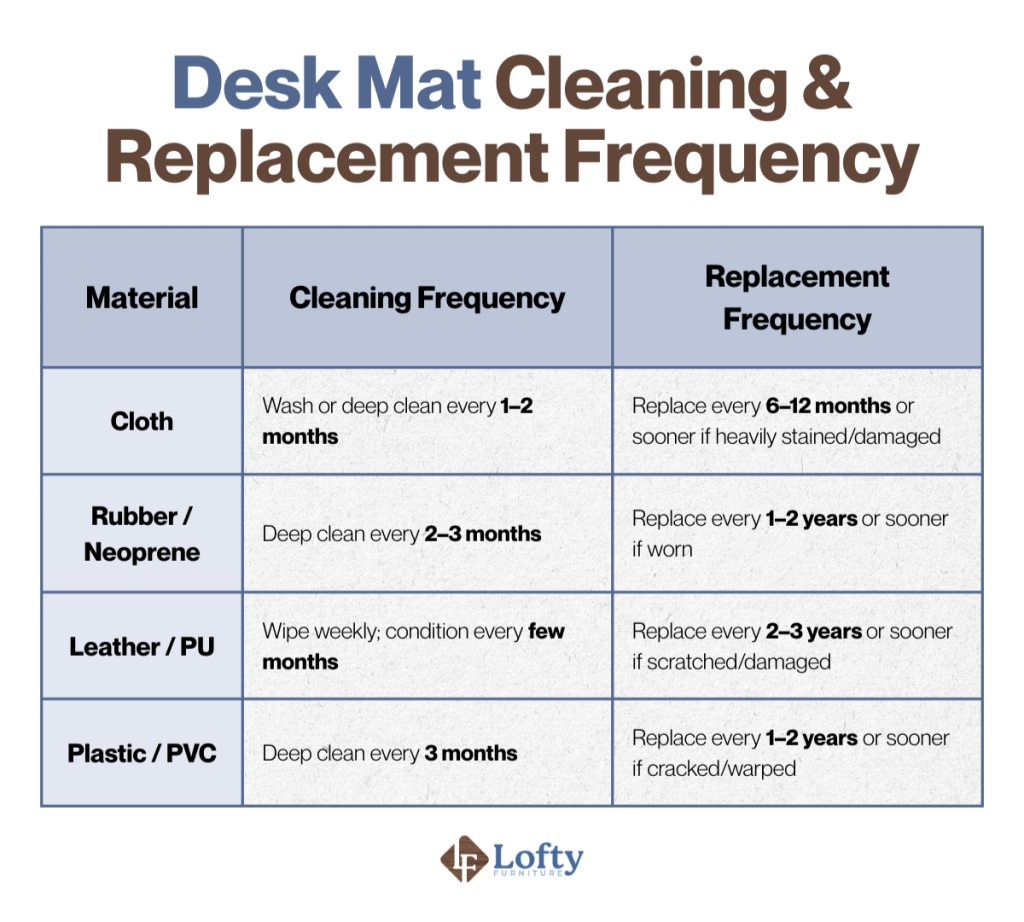
Cleaning your desk pad doesn’t have to be complicated. The key is matching the method to the material. Hand washing works for most fabric mats, while RGB and electronic models need only a damp wipe. Always air dry thoroughly and avoid heat, bleach, and submersion for sensitive types.
With regular maintenance including weekly wipes, spot cleaning, and monthly deep cleans your desk pad can stay smooth, hygienic, and functional for 3 to 5 years or more. Keep this guide handy, and you’ll always know how to clean your desk pad the right way.
Frequently Asked Questions About Cleaning Desk Pads
Can I machine wash my desk pad?
Only machine wash non-RGB, edge-stitched fabric mats labeled as machine washable. Use cold water, gentle cycle, and minimal detergent. Air dry completely afterward. Never machine wash leather, PVC, RGB, or felt pads.
How often should I clean my desk pad?
Clean desk pads every 7 to 10 days for daily use. Moderate use allows for cleaning every 2 to 4 weeks. Light use requires monthly cleaning or as needed when spills occur.
Can I use alcohol to clean my desk pad?
Yes, 70% isopropyl alcohol works well for disinfecting and removing ink stains. Dampen a cloth and wipe gently. Avoid saturating the pad, and let it dry completely before use.
How do I dry my desk pad after washing?
Remove excess water with a rubber squeegee or towel press. Air dry flat on a rack or hang vertically with non-metal clips. Avoid direct sunlight, heaters, and tumble drying.
What should I do if my RGB desk pad gets wet?
Unplug the mat immediately. Wipe with a barely damp microfiber cloth. Dry thoroughly with a clean dry cloth. Let it rest overnight on a flat surface before reconnecting power.
How do I remove stubborn stains from my desk pad?
For tough stains, create an OxiClean solution and soak the affected area for 30 minutes to overnight. Rinse thoroughly and air dry. Test any cleaning solution on a small edge area first.





