
Is your desk too low? You’re not alone. Millions of people suffer from shoulder strain, wrist pain, or poor posture because their desk doesn’t match their body. The solution is to raise your desk easily and affordably. Whether you’re 6’2″ and sinking into your chair or just need a 2-inch boost for better typing alignment, this guide delivers every proven method to lift your desk safely and effectively.
You’ll learn how to pick the right height based on your body, choose from over ten upgrade paths ranging from $8 risers to custom-built frames, and avoid common mistakes that cause wobbling or damage. We cover exactly what works for particle board, solid wood, or leased office furniture, backed by user data, ergonomic science, and real-world testing.
Calculate Your Perfect Desk Height for Ergonomic Comfort

Measure for Seated Comfort
Sit in your chair with feet flat on the floor and thighs parallel to the ground. Bend your elbows to 90 degrees as if typing. Have someone measure from the floor to your elbow crease. That number is your ideal desk height.
Most adults need between 28 and 30 inches, but taller users over 6 feet often require 32 to 36 inches. If your desk is 28 inches and your elbows sit at 32 inches, you need a 4-inch lift.
Adjust for Standing Work
Stand straight with arms at your sides. Your desk should align with your elbows. Use this formula: standing desk height equals your height in inches multiplied by 0.43, plus 11.5. For example, a 6-foot person needs roughly 43 inches of clearance.
Spot the Warning Signs
You need a higher desk if your thighs press against the desk underside, your shoulders hunch while typing, your wrists bend up or down, your neck aches from looking down at the screen, or your elbows cannot stay at 90 to 110 degrees. Fixing desk height is not just about comfort, it is long-term injury prevention.
Lift Your Desk with Furniture Risers: Quick and Affordable
Choose the Right Riser Type
Furniture risers are the fastest, cheapest way to raise a desk. They slip under each leg and come in plastic, wood, or metal. Plastic risers cost $8 to $22 for a 4-pack, lift 2 to 6 inches, and hold up to 6,000 pounds total. Wood risers blend with decor and support 1,000 to 5,000 pounds per riser. Metal risers are most durable and ideal for heavy executive desks. Stackable models let you mix heights, like 3 inches plus 5 inches equals 8 inches, for full customization.
Install Without Tools
Lift the desk and get help if it is heavy. Place riser under each leg and center legs in recessed cups. Add non-slip pads or a rug underneath. Ensure all legs sit evenly because even a 1/8-inch gap can cause wobble.
Avoid Common Pitfalls
Risers extend the desk’s footprint, so it may not push flush against the wall. Some users report slight instability. Fix this with leveling shims or felt pads under uneven legs. Top picks include EclatBain Bed Risers at $21.78 for 4.3-inch lift with 4,000-pound capacity, or Adjustable Screw Clamp Risers at $27.99, fitting frames up to 1.5 inches thick.
Add Felt or Wooden Pads for Small Height Gains
When to Use Pads
Felt or wooden pads are perfect for minor lifts of just 1/8 inch to 1 inch. They protect floors and add subtle elevation. Felt pads cost $5 to $10 and add 1/8 inch to 1/2 inch. Wooden blocks cost $16.99 for a 4-pack and provide 1-inch to 2-inch lift. Some Reddit users report success using cut acoustic panels under legs for both height and sound control.
Use pads if you only need leg clearance, want to preserve the desk’s look, or are in a rental and cannot make permanent changes. This method is not for heavy loads or lifts over 1 inch.
Install a Standing Desk Converter for Sit-Stand Flexibility
Get the Best of Both Worlds
A standing desk converter sits on top of your current desk and lifts your keyboard and monitor. It is the best solution if you want to switch between sitting and standing without changing your furniture. Top models include Mount-It! Converter at $39.99 with gas spring and 2.5-inch low profile, FITUEYES 32-inch Model at $139.99 with dual monitor support, Amazon Basics Riser at $23.99 with storage holding 22 pounds, and FlexiSpot models featuring LED screens, memory presets, and USB ports.
Set It Up Correctly
Center the unit on your desk. Adjust height so the monitor top is at eye level. Set keyboard tray for 90-degree elbows. Use slowly to prevent tipping. Load capacity ranges from 20 to 50 pounds, so do not overload.
Weigh the Pros and Cons
Pros include no desk modification, easy installation and removal, and great for offices or rentals. Cons include reduced space under the desk, possible top-heavy feel, and high-end models costing nearly as much as full standing desks. This method works best for hybrid workers who value flexibility over floor space.
Replace Desk Legs with Taller Ones for a Clean Look
Upgrade Your Desk Permanently
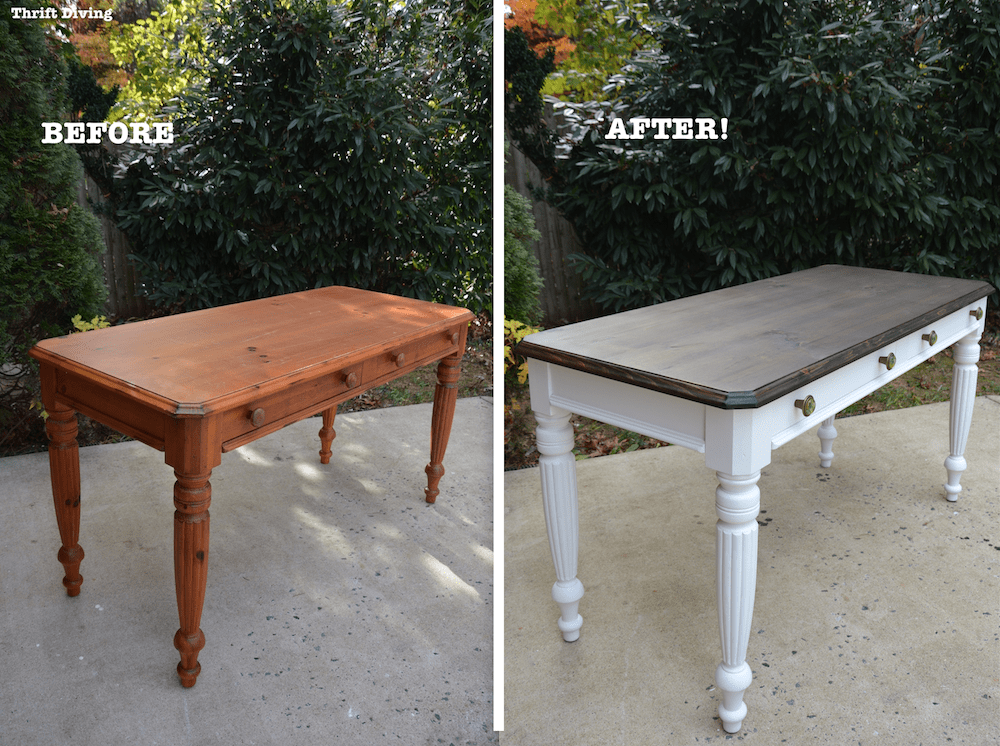
Swap short legs for longer ones. This is the sleekest permanent fix. Choose from wood, metal, hairpin, or trestle styles. Common heights include 24, 28, 32, and 36 inches. Match the mounting pattern, usually 3/8-inch or 1/2-inch threaded inserts.
Follow These Steps
Unscrew old legs from the desk frame. Attach new legs using provided bolts. Tighten securely and check for level. Use a wrench or screwdriver and ensure all legs are the same length. This method works only if legs are removable and not for desks with fixed frames.
Extend Legs with Add-Ons for Extra Height
Add Height Without Full Replacement
Leg extenders bolt onto existing legs, adding 2 to 6 inches of lift. Made from wood or metal, they blend with original legs.
Install with Care
Drill pilot holes into the bottom of each leg. Screw extender in place. Repeat for all legs and verify stability. Use thick screws, number 14 or 3/16-inch, and avoid over-tightening. This method works best on solid wood or thick composite. Avoid on particle board unless reinforced with internal blocks or threaded inserts.
Screw On Bun Feet for Style and Height
Elevate with Elegance
Bun feet are rounded, decorative feet that screw into the bottom of legs. They add 3 to 10 inches and give executive-style flair. Available in wood, metal, or plastic. Match the finish to your desk.
Install in Minutes
Mark drill points on leg bottoms. Drill pilot holes. Screw in bun feet securely. Use screws long enough to grip but not pierce the top surface. This is a design-first solution ideal if aesthetics matter. Easy to remove if needed. Not for particle board unless reinforced.
Build a Support Frame Under the Desk for Maximum Stability
Create a Custom Solution
For heavy or oversized desks, build a custom wooden frame. This is the strongest method. Rip a 2×6 down to 4-inch width. Cut pieces to fit inside desk footprint. Assemble into a rectangle. Place desk on frame. Secure with metal mending plates at corners. Optionally attach 3/4-inch wood strips under the desk to hide the frame. Paint the frame black to make it less visible.
Why DIYers Love It
This method is extremely sturdy and handles heavy loads. It is fully customizable but requires tools and basic carpentry. It is permanent and reduces under-desk space.
Add Casters for Height and Mobility
Gain Inches and Move Freely
Casters add 2 to 4 inches and let you roll the desk when needed. Choose swivel or rigid types with locking brakes. Use soft rubber wheels on hardwood or tile.
Install Properly
Turn desk upside down. Attach casters to leg bottoms with screws. Drill holes if needed. Ensure all casters are the same height.
Know the Risks
Casters can roll unintentionally on uneven floors and may cause instability if not locked. Avoid on particle board because screws strip easily. Reinforce with threaded inserts or internal wood blocks if using on weak materials.
Use Aluminum Tubing for Hidden Strength
Upgrade from Inside the Frame
For a sleek, invisible fix, mount 3/4-inch by 1-1/2-inch aluminum box tubing to the inside corners of the desk. Cut tubing to side height plus 4 inches. Pre-drill four holes per piece, starting 6 inches from top. Spray-paint to match desk, like hammered black. Mount tubing flush with top edge, 1 inch from front. Use number 14 screws and pilot holes. Add black felt feet or threaded inserts at base.
Why It Works
This method is nearly invisible from the front. It remains strong even on particle board if piloted. It preserves legroom. Best for desks with 3/4-inch thick side panels. Requires precision.
Handle Particle Board with Care
Avoid Screw Failure
Particle board strips easily. Never skip pilot holes. Use shorter, thicker screws, number 14 or 3/16-inch.
Reinforce Weak Spots
Glue wooden blocks inside legs before screwing. Install threaded inserts or T-nuts for repeated use. Limit modifications if panel is thinner than 3/4 inch. Particle board does not act like solid wood because it is not. Best methods for particle board are risers or desktop converters. Avoid drilling when possible.
Ensure Stability and Safety
Prevent Wobbling
Always raise all four legs by the same amount. Even a small difference causes sway. Use non-slip pads under legs, rubber feet or felt glides, and anti-slip rug under the entire setup. If wobbling persists, insert leveling shims under the low side.
Check Load Limits
Do not exceed the weight rating. Plastic risers handle up to 1,300 to 6,000 pounds for a 4-pack. Metal legs support 1,000 to 5,000 pounds per riser. Converters hold 20 to 50 pounds maximum. Overloading risks collapse.
Match the Fix to Your Needs
Choose based on your situation. For 1 to 2 inches, use felt pads or wooden blocks. For 3 to 6 inches, use stackable risers or leg extenders. For sit-stand capability, use a desktop converter. For aesthetics, replace legs or use aluminum tubing. For renting, choose non-invasive risers or converter. For DIY lovers, build a wooden frame or custom legs. For heavy desks, use metal risers or built-in frame. For particle board, use risers or top-mounted converter.
Maintain Your Raised Desk
Check Monthly
Tighten all screws and bolts. Inspect for warping or stress cracks. Clean under risers to prevent dust buildup. Manage cables to avoid strain.
Optimize Ergonomics
After raising your desk, adjust your chair so feet are flat and knees at 90 degrees. Set monitor top at eye level. Keep wrists straight while typing. Use lumbar support. Alternate sitting and standing if using a converter.
Frequently Asked Questions About Raising a Desk
How much does it cost to raise a desk?
You can raise a desk for as little as $8 using basic plastic risers. Mid-range options like wooden blocks cost around $17, while standing desk converters range from $40 to $140. Full leg replacement or custom frames can cost more depending on materials.
Can I raise a desk without buying new furniture?
Yes. Furniture risers, felt pads, wooden blocks, standing desk converters, and leg extenders all allow you to raise your existing desk without replacing it. These methods range from non-invasive temporary solutions to semi-permanent modifications.
Will raising my desk make it wobble?
Not if you raise all four legs by the same amount. Even a 1/8-inch difference can cause wobble. Use non-slip pads, felt glides, or leveling shims to ensure stability. Always check that risers are seated properly and legs are centered in the cups.
Is it safe to raise a particle board desk?
Yes, but with caution. Particle board holds screws poorly and can strip. Use non-invasive methods like risers or top-mounted converters whenever possible. If drilling is necessary, always pilot drill first and consider reinforcing with wooden blocks or threaded inserts.
What is the easiest way to raise a desk temporarily?
Furniture risers are the easiest temporary solution. They require no tools, install in minutes, and are completely removable. This makes them ideal for renters or anyone who may need to revert the changes later.
How do I know if my desk is too low?
Watch for these signs: thighs pressing against the desk underside, shoulders hunching while typing, wrists bending up or down, neck aches from looking down at the screen, or elbows that cannot stay at 90 to 110 degrees. These indicate you need a higher desk for proper ergonomics.
Key Takeaways for Raising Your Desk
Raising your desk is one of the most cost-effective ergonomic upgrades you can make. Small changes, like a 2-inch lift, can prevent years of back and neck pain. For quick fixes, use furniture risers or pads. For flexibility, install a standing converter. For permanence, replace legs or build a frame. For rentals, stick to non-invasive, removable options. Always prioritize even lift, weight capacity, and material strength. When in doubt, start with risers because they are cheap, safe, and reversible.
Your body will thank you. A properly raised desk means better posture, less fatigue, and more productive workdays. Whether you are 5’5″ or 6’5″, there is a perfect solution waiting, no replacement needed.





