
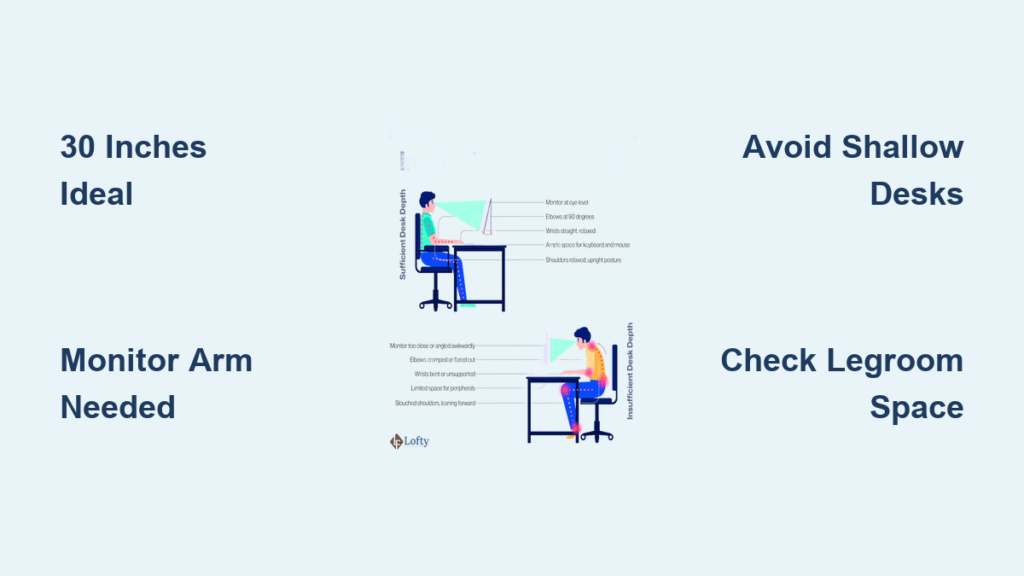
Choosing the right desk depth is crucial for comfort, productivity, and long-term health, but it is often overlooked. Many people focus only on desk height or style, only to end up with a workspace that forces them to hunch forward, strain their eyes, or constantly knock their knees against tight legroom. The truth is, how deep a desk should be depends on your work type, equipment, body size, and room space.
A desk that is too shallow limits monitor placement and causes eye strain. One that is too deep forces you to overreach for your keyboard or lose proper back support. The ideal depth strikes a balance: enough room for your gear, while keeping everything within ergonomic reach. Based on expert guidelines and ergonomic research, 30 inches (75 cm) is the sweet spot for most professionals. But depending on your setup, the right depth can range from 24 to 40+ inches.
Standard Desk Depths and What They Mean for You
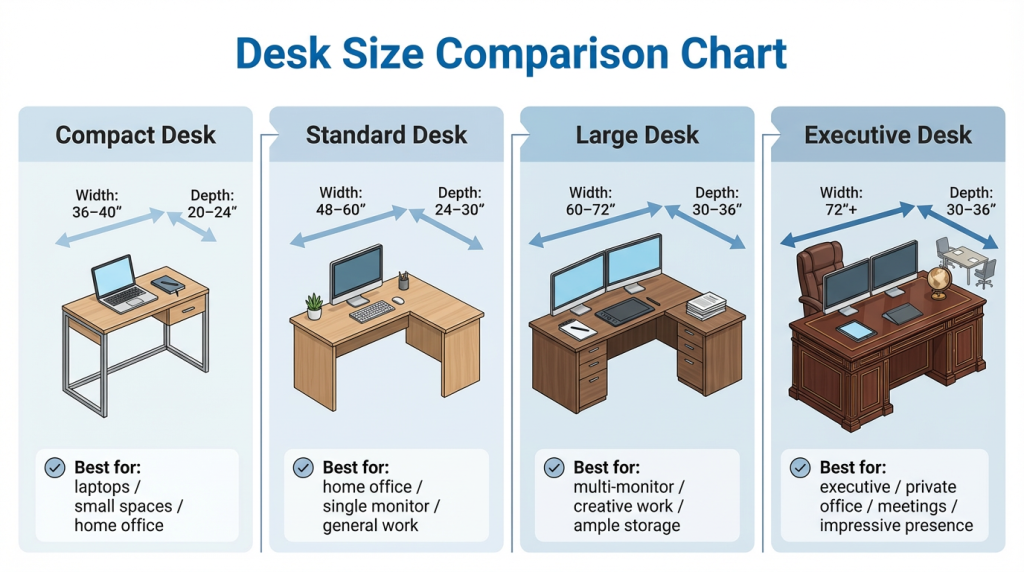
Desks come in a range of depths, and knowing the most common sizes helps you choose wisely based on your use case and space.
Compact Desks: 18 to 24 Inches
This depth works best for writing, reading, and laptop-only use. It is ideal for students, remote workers with minimal gear, or anyone in a small apartment. The limitation is that these desks are too shallow for dual monitors or full-size keyboards. A 24-inch depth is the bare minimum for computer work, and it is only viable if you use a laptop or a small screen on a stand.
Warning: Avoid placing a 27-inch or larger monitor on a 24-inch desk without a monitor arm. It will sit too close, causing eye strain and forward head posture.
Transitional Depth: 25 to 27 Inches
This range includes common options like IKEA Linnmon tops and Home Depot butcher blocks. It works for single monitor setups with a few accessories. The trade-off is that it is just enough space, but tight for dual screens. Many users report success with this size, but only when they keep the front clear and mount their display.
User Tip: One Reddit user shared, “I use a 25-inch butcher block and it works fine because my monitor is mounted.”
The Gold Standard: 30 Inches
A 30-inch deep desk is widely considered the optimal depth for professional use. It allows you to place your monitor at arm is length (20 to 30 inches) while keeping your keyboard close and wrists neutral. It also leaves room behind the monitor for small accessories or cable management.
Expert Consensus: OSHA, Ergotron, and Fully all recommend 30 inches as the ideal depth for ergonomic computing.
For Power Users: 36+ Inches
Desks 36 inches or deeper are built for traders, gamers, video editors, and multi-monitor setups. They offer ample legroom, cable space, and surface area. The caveat is that they require a large room and careful monitor placement. Just be sure not to place your monitor at the back edge, as this forces overreaching.
Fix: Use a monitor arm to bring the screen forward while keeping the rest of the desk deep for gear.
Why Desk Depth Impacts Your Health and Posture
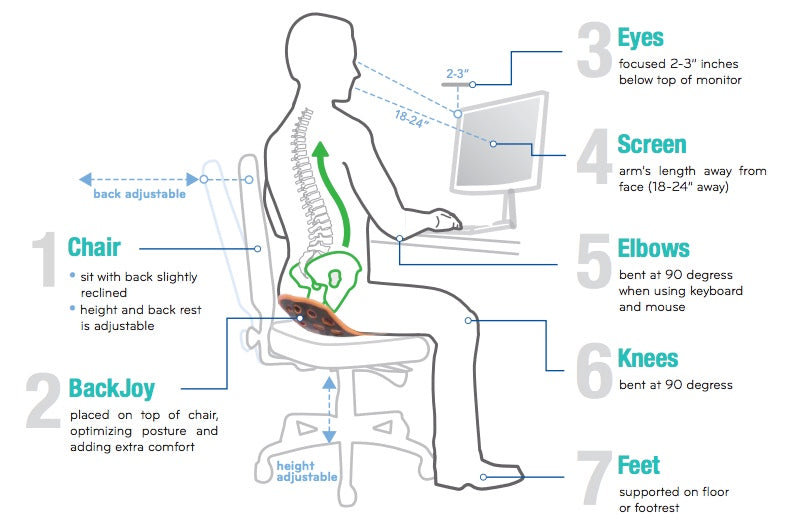
Your desk depth directly impacts posture, comfort, and long-term health. Even a 6-inch difference can mean the difference between a pain-free workday and chronic neck or back strain.
Monitor Distance and Eye Strain
The distance from your eyes to the screen should be 20 to 30 inches, or roughly 1 to 1.5 times the diagonal size of your monitor. A 27-inch monitor should be placed 27 to 40 inches away. A 32-inch monitor should be placed 32 to 48 inches away.
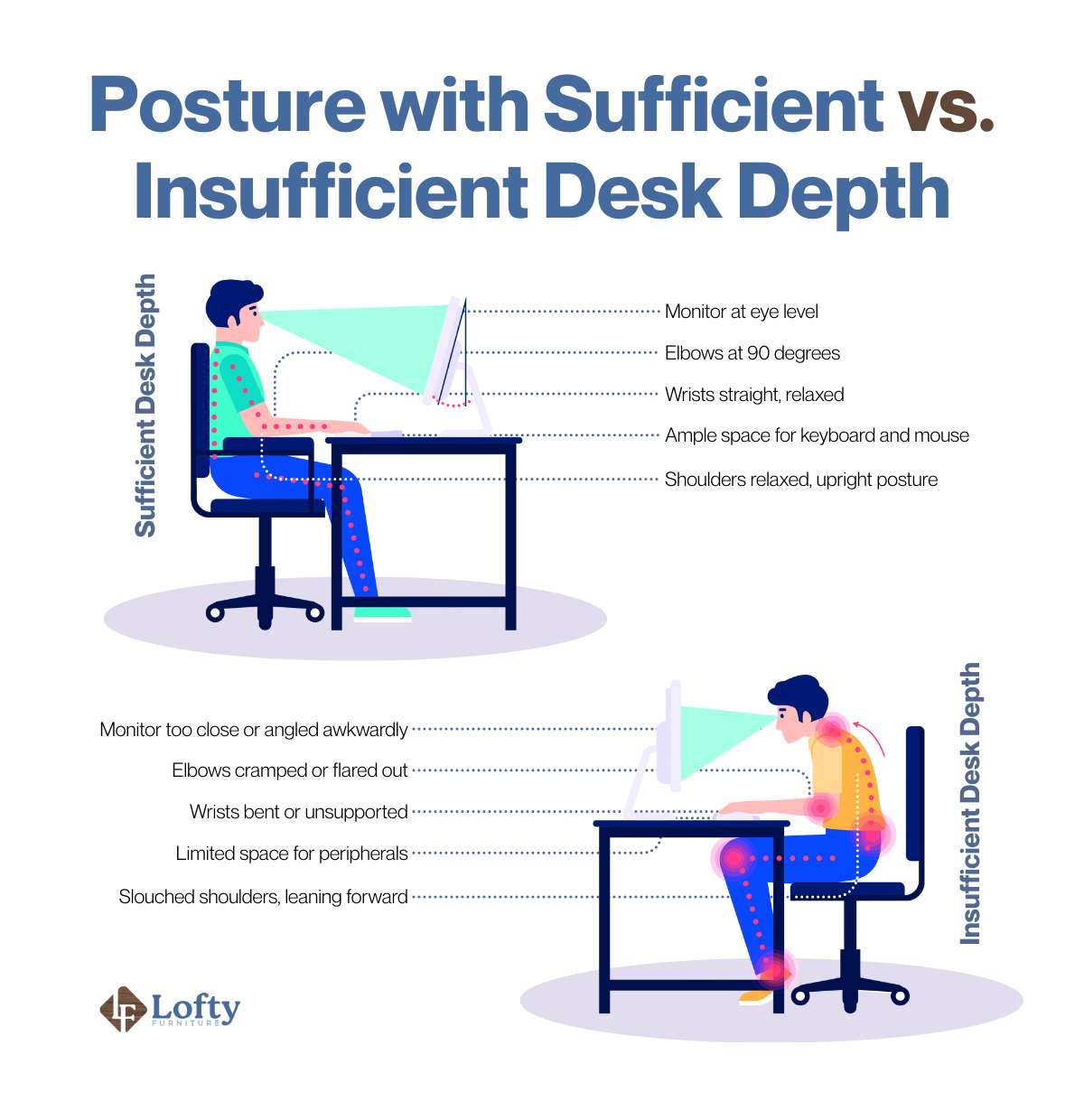
On a 24-inch desk, a large monitor on its stand will sit too close, forcing you to lean back or squint. This leads to digital eye strain, headaches, and forward head posture.
Solution: Use the arm is length test. Sit in your chair, extend your arm, and your fingertip should touch the screen. Adjust depth or use a monitor arm to achieve this.
Keyboard and Mouse Placement
Your arms should form a 90-degree angle at the elbows, with wrists straight and shoulders relaxed. The keyboard should sit 4 to 6 inches from the front edge. The mouse should be within easy reach, not stretched to the side. The minimum depth needed is 28 to 30 inches to fit keyboard, mouse, and allow wrist clearance.
Shallow desks (24 inches) often force the keyboard to the very front, leaving no room for wrist support or mouse movement. This increases the risk of carpal tunnel and shoulder tension.
Pro Tip: Use a monitor arm to free up front desk space. This lets you move the keyboard closer while pushing the screen back.
Legroom and Seating Posture
A desk that is too deep can hurt more than help. If the desktop extends too far back, you may not be able to slide your chair fully underneath, forcing you to sit too far forward and lose lumbar support. The minimum leg clearance is 24 to 27 inches front-to-back under the desk. The chair clearance behind the desk should be 20 to 30 inches for movement.
User Experience: One tall user preferred a 40-inch desk purely for legroom, even though he did not need the full surface.
Best Desk Depth for Different Work Setups
The right depth depends on what you do at your desk. Here is a quick guide to match depth to your workflow.
Single Monitor or Laptop Work
The recommended depth is 24 to 30 inches. This is enough for screen, keyboard, and mouse. The key tip is to use a monitor arm if under 30 inches. A 24-inch desk works for a single 24-inch to 27-inch monitor, especially if you elevate or mount it.
Avoid: Placing a large monitor directly on a 24-inch desk. It will sit too close.
Dual-Monitor Setup
The minimum depth is 30 inches, with 30 to 36 inches being ideal. This allows both screens to sit at proper viewing angles. Dual monitors need space to avoid crowding. A 25-inch desk is too narrow, forcing one screen to the edge or too close.
Setup Tip: Angle side monitors slightly inward for better ergonomics.
Gaming and Streaming
The recommended depth is 30 to 36+ inches. This needs space for console, mouse, keyboard, mic, webcam, and streaming gear. Deeper desks offer better cable management. Gamers often pack their desks with RGB lighting, headsets, controllers, and drink holders.
Warning: Do not let your monitor sit at the back of a 36-inch desk. Use a monitor arm to pull it into the 20 to 30 inch sweet spot.
Content Creation and Design
The ideal depth is 30 to 36+ inches. This accommodates tablets, reference monitors, color calibrators, and notebooks. Graphic designers, video editors, and photo retouchers need space for tools beyond just a keyboard.
Pro Setup: Use a monitor arm plus riser to create under-monitor storage for tablets or chargers.
Financial Trading and Data Analysis
The required depth is 30 to 40+ inches. This supports 3 to 6 monitors, Bloomberg terminals, and physical input devices. Traders need every inch of space. Just ensure monitors are positioned at proper distances.
Space Hack: Use vertical monitor mounts to save depth while adding screen count.
How to Measure and Choose the Right Depth
Choosing the right desk depth involves more than just picking a number. You need to consider your room, your body, and your equipment.
Step 1: Measure Your Room
Ensure you have 20 to 30 inches behind your chair for movement. The desk should fit comfortably in your space without making the room feel cramped.
Step 2: Define Your Use
Consider what you do at your desk. Single screen, dual monitors, gaming, or creative work all require different depths. Write down your primary activities and any secondary uses.
Step 3: Test the Arm is Length Rule
Sit in your chair and extend your arm. Your fingertip should touch the monitor. This is the ideal viewing distance regardless of desk depth. Use this to guide your purchase.
Step 4: Account for Accessories
Consider what else will be on your desk. Keyboard, mouse, notepad, phone, coffee cup, and other items all take space. Add at least 6 inches of buffer beyond what you think you need.
Fixing a Desk That Is Too Shallow or Too Deep
Even if you cannot replace your desk, you can optimize it for better ergonomics.
Fixing Shallow Desks Under 24 to 25 Inches
Use a Monitor Arm: This frees up front desk space and lets you position the screen at ideal distance. It is best for 24 to 25-inch desks, dual monitors, and sit-stand transitions. Top picks include Ergotron LX and AmazonBasics gas-spring arms.
Elevate with a Stand or Riser: This raises the screen to eye level and creates storage underneath. It is cheaper than arms but less flexible.
Mount to the Wall: This is ideal for window-adjacent or tiny rooms. It requires wall stud access and is not renter-friendly.
Limitation: One user noted, “I am against a window, so I cannot wall mount.”
Optimizing Deep Desks Over 36 Inches
Bring Monitor Forward: Use a monitor arm to position screen at 20 to 30 inches. This prevents overreaching and slouching.
Add Under-Desk Storage: CPU trays, drawers, or shelves free up surface space. This keeps cables and gear organized.
Use Cable Management: Velcro straps, clips, or raceways reduce clutter. This improves usability and aesthetics.
Common Desk Depth Mistakes to Avoid
Many people make the same errors when choosing desk depth. Avoid these pitfalls to save yourself discomfort and money.
Buying for Looks Instead of Function
Do not pick a desk by looks or price alone. Choose depth based on your work, body, and room. A beautiful desk that causes pain is not worth it.
Ignoring Monitor Size
A common mistake is pairing a shallow desk with a large monitor. A 32-inch monitor on a 24-inch desk will force you to sit too close. Always match desk depth to your monitor size.
Forgetting About Legroom
A desk that is too deep can hurt more than help. If the desktop extends too far back, you may not be able to slide your chair fully underneath. This forces poor posture.
Skipping the Monitor Arm
Many users report that a monitor arm made their 25-inch desk “perfect.” This simple addition frees up valuable front space and improves ergonomics.
Frequently Asked Questions About Desk Depth
What is the ideal desk depth for most people?
The ideal desk depth for most people is 30 inches (75 cm). This supports dual monitors, proper ergonomics, and a clean workflow. It is the gold standard recommended by OSHA, Ergotron, and Fully.
Can a 24-inch desk work for computer work?
A 24-inch desk can work for computer work, but only if you use a laptop or small monitor. For larger screens, you need a monitor arm to push the screen back. Without one, the monitor sits too close and causes eye strain.
What desk depth do I need for dual monitors?
You need at least 30 inches for dual monitors. This allows both screens to sit at proper viewing angles without crowding. A 25-inch desk is too narrow for two monitors.
How does desk depth affect posture?
Desk depth affects posture in two main ways. First, shallow desks force monitors too close, causing forward head posture. Second, overly deep desks cause overreaching for the keyboard, leading to slouching and back pain.
What if my desk is too shallow for my needs?
If your desk is too shallow, use a monitor arm to free up front space. You can also elevate the monitor with a stand or riser. For extreme cases, wall mounting may be an option.
Key Takeaways for Choosing the Right Desk Depth
How deep should a desk be? The answer depends on you. For most people, 30 inches (75 cm) is the ideal depth. It supports dual monitors, proper ergonomics, and a clean workflow. For small spaces, 24 to 25 inches can work if you use a monitor arm and keep your setup minimal. For power users, 36 inches or more is justified for multi-monitor, gaming, or creative work, but keep your screen at arm is length.
The bottom line is this: do not just pick a desk by looks or price. Choose depth based on your work, body, and room. A well-chosen desk depth prevents pain, boosts focus, and makes every work session more comfortable. Measure your space, define your use case, and test the arm is length rule before buying. Your back will thank you.





