
Choosing the right desk starts with accurate measurements, but it is not just about the desk itself. You need to measure your space, account for movement, and align with your body is needs. How to measure a desk properly ensures comfort, functionality, and long-term ergonomics. Whether you are setting up a home office, fitting an L-shaped desk into a corner, or selecting a sit-stand model, precise dimensions prevent costly mistakes and posture problems.
In this guide, you will learn how to measure desk length, depth, and height, plus how to plan for chairs, monitors, and clearance zones. We will cover corner desks, ergonomic reach, and safety standards, all based on real-world spatial and human factors. By the end, you will know exactly how to avoid the most common desk sizing errors.
Measure Desk Dimensions Correctly
Every desk has three core measurements that determine fit, usability, and comfort. Understanding these dimensions is essential when selecting a desk that fits both the room and your physical needs.
Know Length, Depth, and Height
The three primary dimensions define every desk is size. Use a metal tape measure for accuracy and record each dimension in both inches and centimeters.
- Length (L): Measured side-to-side across the front edge of the desk. Standard desks range from 24 to 72+ inches.
- Depth (D): Measured from the back to the front edge. Most desks are 20 to 30 inches deep.
- Height (H): Measured from the floor to the top surface. Standard height is 29 to 30 inches (74 to 76 cm).
Avoid Common Measurement Mistakes
Many people measure only the desk, not the space. This leads to blocked doorways, cramped legs, or unreachable corners. A 1-inch error can prevent full chair pull-out or cause monitor strain.
- Do not assume wall space equals usable space. Baseboards, outlets, and vents reduce clearance.
- Do not ignore chair space. Add 30 inches to desk depth for reclining and movement.
- Do not measure over carpet pile. Measure to the subfloor to avoid height miscalculations.
Always double-check with a second pass for accuracy.
Standard Desk Size Guidelines

Selecting the right desk size depends on your use case and equipment. Here are the typical dimensions to guide your decision.
Typical Dimensions by Use Case
| Use Case | Length | Depth | Height |
|---|---|---|---|
| Compact (laptop) | 24-36 in | 20-24 in | 29-30 in |
| Standard office | 48-60 in | 24-30 in | 29-30 in |
| Dual monitor | 60-72 in | 30 in | 29-30 in |
| L-shaped | 72+ in (total) | 24-30 in | 29-30 in |
| Student desk | 31-47 in | 18-24 in | 27.5-31.5 in |
Smaller desks under 48 inches work for laptops and light tasks. Larger setups at 60+ inches support dual monitors, keyboards, and documents. For tall users over 6.5 feet, consider a height-adjustable desk up to 32 inches. Shorter users under 5 feet may need desks as low as 22.5 inches.
When to Choose an Adjustable Desk
Fixed-height desks fit only a narrow range of users. Height-adjustable desks support 5th to 95th percentile body types.
- Sitting height: 22.5 to 29 inches
- Standing height: 36 to 48.5 inches
- Dual-motor models handle heavy loads up to 172 lbs without strain
If multiple people use the desk, or you want to sit and stand, an adjustable desk is essential.
How to Measure Desk Height
Desk height determines seated or standing comfort and must align with chair height and user anthropometry. Getting this measurement wrong leads to poor posture and long-term discomfort.
Find Your Ideal Sitting Height
Your desk height should let your elbows rest at 90 degrees when typing. Follow these steps to find your ideal measurement.
- Sit in your chair with feet flat on the floor.
- Hold arms parallel to the floor.
- Measure from the floor to your elbow crease.
- That number is your ideal desk height.
Most adults need 29 to 30 inches, but individual needs vary. Use this number to choose or adjust your desk.
Adjust for Standing Desks
For sit-stand desks, set two presets for maximum benefit. Follow the 20-8-2 rule: Sit for 20 minutes, stand for 8 minutes, move for 2 minutes. This reduces fatigue and supports spinal health.
- Sitting: Elbows at 90 degrees, shoulders relaxed.
- Standing: Forearms parallel to floor, monitor at eye level.
How to Measure Desk Depth
Desk depth indicates how far the desktop extends into the room and affects monitor distance and functional reach. Choosing the right depth prevents eye strain and postural problems.
Choose the Right Depth for Your Setup
The depth you need depends on your equipment and workflow. If your desk is too shallow, your screen will be too close, causing eye strain. Too deep, and you will overreach, breaking neutral posture.
- 20 to 24 inches: Enough for a laptop and mouse.
- 30 inches: Ideal for dual monitors, mechanical keyboards, and notebooks.
- 34+ inches: Required for ultrawide monitors or boom arms.
Test Functional Reach
The maximum reach to your work zone should be 30 to 35 inches from your seated position. Place your chair in position and extend your arm forward. Your fingertips mark the limit. Key items like keyboard, mouse, and phone must stay within this zone.
Use a monitor arm to pull screens forward if your desk is deep. This keeps your eyes at the right distance.
How to Measure Desk Length
Length is the horizontal measurement from left to right across the work surface. Planning for equipment and movement ensures you have enough space for productivity.
Plan for Equipment and Movement
Minimum usable length is 24 inches, but that is only suitable for a laptop. For real productivity, you need more.
- 48 inches: Minimum for dual monitors.
- 60 inches: Comfortable for keyboard, mouse, documents, and peripherals.
- 72+ inches: Ideal for L-shaped or executive desks.
Measure your gear first, including monitor width (add 2 to 4 inches between screens), keyboard and mouse (18 to 24 inches), and writing space (10+ inches). Add 6 to 12 inches for breathing room. A crowded desk causes clutter and stress.
Measuring for an L-Shaped Desk
L-shaped desks require more planning than standard rectangular desks. You must measure both walls, verify angles, and account for architectural features.
Map Both Walls Accurately
L-shaped desks need two wall measurements. Measure the primary wall (longest side) and the secondary wall (return side). Note locations of power outlets, windows, vents, and door swings. Avoid blocking outlets or vents. Position the return where it will not interfere with movement.
Verify the Corner Angle
Most corners are not perfect 90 degrees. Use the 3-4-5 triangle method to check.
- Mark 3 feet on one wall.
- Mark 4 feet on the adjacent wall.
- Measure the diagonal. If it is 5 feet, it is a true right angle.
If not, your L-desk may not fit flush. Use a digital angle finder for precision.
Account for Baseboard Protrusion
Baseboards stick out 0.5 to 1.5 inches. If you do not subtract this, your desk will not sit flush. Measure baseboard depth and subtract it from your wall length. Use this adjusted number when buying or building. A desk that is 1 inch too long will rock or gap at the back.
Measure to Subfloor in Carpeted Rooms
Carpet compresses under heavy desks, up to 0.5 inches. Lift the carpet edge and measure from the subfloor. This ensures accurate height and clearance. If you measure over the pile, your desk may be too low or too high when installed.
Calculate Dynamic Clearance
You need space to move, not just sit. Add 30 inches to desk depth for chair recline and knee clearance. For example, a 25-inch deep desk needs 55 inches of room depth. This follows BIFMA G1-2013 standards for safe, functional workspace design.
Avoid the Dead Zone
The inner corner of an L-desk is often inaccessible, too far to reach comfortably. Place primary monitor and keyboard on the main desk. Use the return for storage or secondary items. Install a monitor arm to pull equipment forward if needed. Never put frequently used items in the dead zone.
Pre-Purchase Testing Tips
Before buying, test the layout to avoid costly mistakes. These techniques reveal space conflicts early and prevent return hassles.
Use Painter is Tape to Mock Up the Desk
Painter is tape creates a visual representation of your desk is footprint. This free method prevents purchase errors.
- Tape the desk footprint on the floor.
- Mark chair clearance (add 30 inches to depth).
- Check walkways. Minimum clearance is 36 inches per ADA standards.
This visual mock-up reveals space conflicts early.
Simulate Equipment Weight
Heavy setups with dual PCs and monitors can weigh 172 lbs (78 kg). Single-motor desks may run at 97% capacity, which is risky for longevity. Dual-motor desks handle the load at 65% capacity, reducing strain. If you are building a streaming or workstation setup, choose a dual-motor frame.
Ergonomic Best Practices
Your desk should support neutral posture to prevent musculoskeletal strain. Proper alignment reduces fatigue and improves long-term health.
Maintain Neutral Posture
Your desk should support neutral posture with the spine in natural curve, shoulders relaxed, elbows at 90 degrees, and wrists straight. Avoid forward head posture or slouching. Use an adjustable chair and monitor stand to fine-tune alignment.
Follow Monitor Placement Rules
Monitor placement directly affects neck and eye comfort. Follow these guidelines for optimal viewing.
- Viewing distance: 20 to 40 inches per OSHA recommendations.
- Eye level: Top of screen at or slightly below eye level.
- Ultrawide monitors: A 34-inch ultrawide requires about 43 inches depth per THX standards.
If your desk is too shallow, use a carbon fiber monitor arm to extend backward and elevate the screen.
Safety and Certification Standards
For electric or standing desks, certain certifications are non-negotiable. These standards ensure safety and durability.
Check Required Certifications
Always verify these labels before purchasing an electric desk.
- UL 962: Electrical safety for motorized furniture. Prevents fire and motor failure.
- CPSC STURDY Act (16 CFR 1261): Anti-tip-over stability. Critical for desks with drawers or returns.
- UL GREENGUARD Gold: Low VOC emissions. Essential for small or poorly ventilated rooms.
Cable and Accessory Management
Proper cable management prevents hazards and extends desk is lifespan. Plan accessory placement during measurement, not after setup.
Keep Cables Organized
Use magnetic cable ties to secure cords to desk legs. Avoid pinching cables between desk and wall during height changes. Route power and data lines behind the desk. Cluttered cables cause tripping hazards and reduce desk mobility.
Optimize with Accessories
Accessories improve functionality but require planning.
- Monitor arms: Improve ergonomics and free desktop space.
- Under-desk trays: Save surface area but reduce legroom. Measure carefully.
- Filing cabinets: Use external storage to keep small desks tidy.
Frequently Asked Questions About Measuring a Desk
What are the three main dimensions when measuring a desk?
The three main dimensions are length (side-to-side measurement across the front), depth (front-to-back measurement), and height (floor to top surface). These determine fit, usability, and ergonomic alignment.
How do I measure for an L-shaped desk?
Measure both walls forming the corner, note outlet and vent locations, verify the corner angle using the 3-4-5 method, account for baseboard protrusion, and measure to subfloor in carpeted rooms. Add 30 inches to desk depth for chair clearance.
What desk depth do I need for dual monitors?
A desk depth of 30 inches is ideal for dual monitors, mechanical keyboards, and workspace. For ultrawide monitors (34 inches), you may need 34+ inches depth or a monitor arm to achieve proper viewing distance.
How do I find my ideal desk height?
Sit in your chair with feet flat, hold arms parallel to the floor, and measure from the floor to your elbow crease. That measurement is your ideal desk height. Most adults need 29 to 30 inches.
What clearance do I need behind my desk?
Add at least 30 inches to your desk depth for chair recline and knee clearance. This follows BIFMA G1-2013 standards and ensures comfortable movement and posture changes.
Should I measure over carpet?
No. In carpeted rooms, measure from the subfloor, not the carpet pile. Heavy desks compress carpet by up to 0.5 inches, which affects final height and clearance calculations.
Key Takeaways for Measuring Your Desk
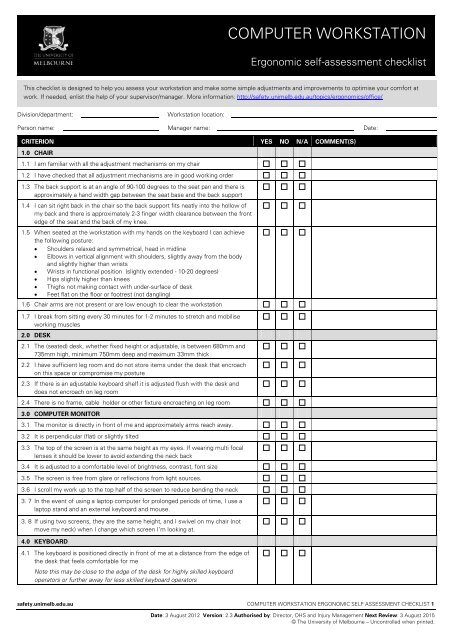
Measuring a desk is not just about size. It is about fit, function, and health. Use this guide to avoid the most common mistakes: ignoring clearance, forgetting baseboards, or misjudging functional reach. Always test with painter is tape, verify corner angles with the 3-4-5 method, and prioritize ergonomic alignment by ensuring your desk height allows a 90-degree elbow angle. Measure to subfloor in carpeted rooms, account for baseboard protrusion when fitting against walls, and add 30 inches to desk depth for proper chair clearance. With the right measurements, your desk will support productivity, comfort, and long-term well-being.





