
Standing desks have transformed from office novelty into essential workspace tools for better health, improved focus, and long-term well-being. If you’re tired of sitting all day and want to build a custom, durable stand-up desk, this guide covers every method from quick budget hacks to professional-grade electric builds. You’ll find step-by-step instructions, material lists, cost breakdowns, and expert tips that work.
Whether you want to convert your current desk, build a riser, or construct a fully motorized standing workstation from scratch, this comprehensive walkthrough helps you choose the right path for your budget and skill level. Let’s get you off the chair and onto your feet.
Choose Your Build Path Based on Budget and Skill
Before grabbing tools, identify which method fits your workspace, budget, and comfort level. Five main paths exist for creating a stand-up desk.
Desk riser (DIY or store-bought) offers the fastest, cheapest route with no tools required. Standing desk converter provides adjustable height while sitting on your existing desk. Monitor arm plus keyboard tray delivers a low-cost ergonomic fix for hybrid setups. Electric frame replacement gives full sit-stand control by upgrading your current legs. Build from scratch provides total customization for advanced DIYers.
Each option carries trade-offs in cost, effort, and results. Budget-conscious beginners should start with a riser or monitor arm. Enthusiasts ready for a smart investment can try the electric frame upgrade. Makers seeking total control will love building from scratch.
Assess Your Needs First
Answer these questions to narrow your path.
Do you want full height adjustability or just a fixed boost? Is this permanent or temporary? What’s your budget range ($20 versus $700)? Do you rent and avoid permanent modifications? How heavy is your setup including dual monitors or a PC tower?
Your answers determine which method serves you best.
Build a DIY Desktop Riser for Under $50
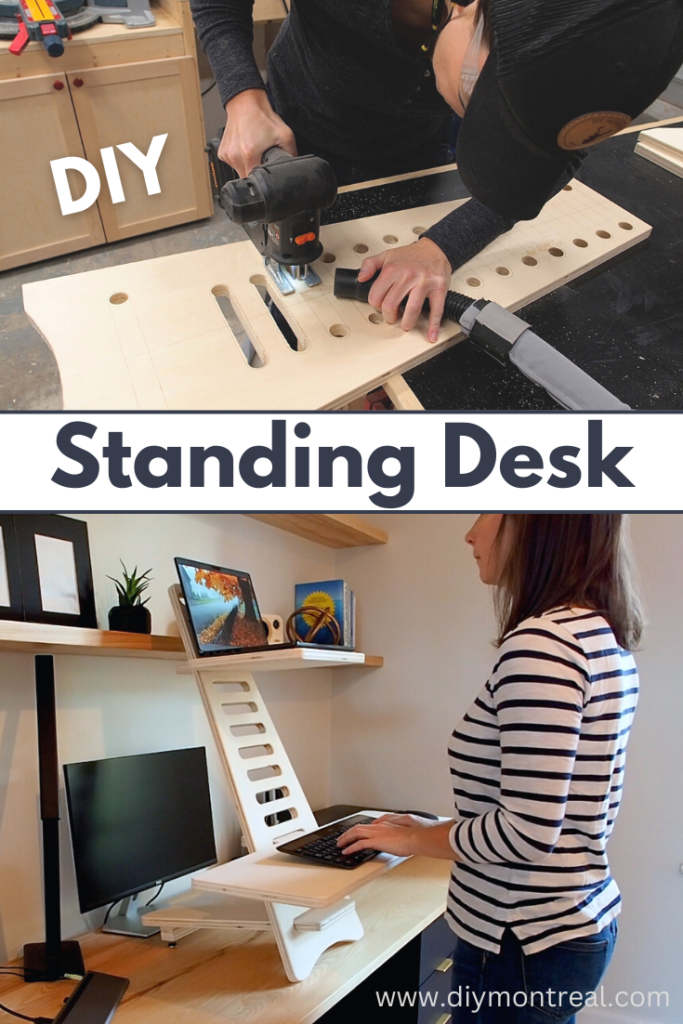
The tiered wooden riser represents the fastest, cheapest way to make a stand-up desk. This method suits beginners, renters, or anyone testing standing work before committing.
Materials Needed
Gather these supplies from any home improvement store.
3/4-inch plywood or solid wood boards. Wood glue. 1-5/8-inch pocket-hole screws. Sandpaper ranging from 120 to 220 grit. Polyurethane or wipe-on finish. Clamps for assembly.
Step-by-Step Build
Cut two shelves from your wood. The top shelf measures 30 by 12 inches for monitors. The bottom shelf measures 30 by 10 inches for keyboard and mouse. Cut four legs at 12 inches tall from 1×4 boards.
Assemble the tiered frame by attaching legs between shelves using pocket holes and wood glue. Angle legs slightly outward for stability. Sand all surfaces smooth, then apply your chosen finish. Add non-slip pads under the feet to prevent sliding.
This build costs approximately $50, takes two to three hours, and supports over 30 pounds while fitting over any existing desk.
Pro Tip: Stain the wood before finishing for a high-end look. Place wax paper under clamps to avoid glue stains that block stain absorption.
Install a Standing Desk Converter

A standing desk converter provides adjustable height without replacing your current desk. This plug-and-play solution sits on top of your existing surface.
Converter Types and Pricing
| Type | Best For | Price Range |
|---|---|---|
| Pneumatic lift | Smooth, quiet motion | $150–$300 |
| Scissor lift | Stability with dual monitors | $200–$400 |
| Fixed riser | Budget-conscious users | $20–$60 |
What to Look For
Choose a converter with at least 6 to 18 inches of height range. Verify weight capacity of 25 pounds or more. Ensure surface area spans 30 inches or wider for dual monitors. Look for built-in cable management trays or clips.
Setup Steps
Place the converter on your desk. Position monitors and keyboard at comfortable heights. Plug in any USB hubs if included. Test the up and down motion to ensure smooth operation.
Converters take up desktop space and can wobble during typing. They’re not ideal for heavy setups. However, the convenience factor makes them unbeatable for many users.
Upgrade with a Height-Adjustable Monitor Arm
Monitor arms suit hybrid sit-stand setups where you stay seated but raise your screen when standing.
How It Works
Mount the arm to your desk edge or grommet hole. Raise the monitor so the top sits at eye level. Use a separate standing keyboard tray at standing height for full ergonomics.
Key Specifications
Ensure VESA compatibility with your monitors. Look for 12 to 20 inches of vertical lift range. Verify desk thickness compatibility ranging from 1 to 2.75 inches.
Installation Process
Clamp the arm to your desk. Attach the monitor plate. Balance with counterweights included. Adjust height and tilt for optimal viewing.
Pro Tip: Use two arms for dual monitors to prevent strain from unbalanced weight distribution.
Pair this with a pull-out keyboard shelf on legs for complete standing ergonomics without full desk replacement.
Replace Desk Legs with Electric Frame
This smart upgrade lets you keep your favorite desktop while gaining full sit-stand control.
Why Electric Frames Win
Electric frames offer full height range from 24 to 50 inches. They support 200 pounds or more. Programmable presets let you save your preferred heights. The clean, modern appearance fits any workspace.
Frame Types Compared
| Type | Speed | Control Features | Price |
|---|---|---|---|
| Single-stage | Fast | Basic up/down | $200–$300 |
| Two-stage | Slower, smoother | 4 presets, USB ports | $300–$600 |
Installation Steps
Remove your old legs or base completely. Flip the desk upside down for easier access. Align the new frame underneath the desktop. Bolt the frame using threaded inserts rather than screws for security. Connect the control box and power supply. Test movement to ensure no obstructions.
This upgrade requires one to two hours and basic tools including a drill and socket wrench.
Build a Full Electric Standing Desk From Scratch
Makers who want total control over size, look, and function should build from scratch.
Core Components and Costs
| Part | Source | Cost |
|---|---|---|
| Linear actuators | eBay, industrial suppliers | $60–$100 each |
| 12V 5A power supply | Electronics stores | $30 |
| DPDT momentary switch | Hardware store | $10 |
| 2×4 lumber for legs | Home Depot | $20 |
| 3/4-inch plywood for desktop | $40 | |
| Drawer slides | $25 | |
| Finish (stain plus poly) | $50 |
Total cost runs approximately $300 with a build time of five to six hours plus drying time.
Step-by-Step Build
Build the desktop first. Rip 2×6 boards to 5-1/4 inches width to remove rounded edges. Join boards using pocket screws, biscuits, and wood glue while alternating grain direction to prevent warping. Sand to 220-grit before applying finish.
Assemble leg units. Build two 2×4 leg frames. Attach full-extension drawer slides to guide vertical movement. Mount linear actuators to the base and top support points.
Wire the system. Connect the power supply to a DPDT rocker switch. Wire the switch to actuators, reversing polarity for up versus down motion. Test thoroughly before final mounting.
Attach the desktop. Use washer-head screws with 1/4-inch clearance holes to allow seasonal wood expansion and contraction.
Finish and protect. Apply three coats of wipe-on polyurethane, sanding lightly with 320-grit between coats. Final polish uses #0000 steel wool for a silky surface.
Pro Tip: Use dye stain like India ink for deep, even color that penetrates wood uniformly.
Hybrid Build: Custom Top Plus Adjustable Frame
This popular DIY path combines a beautiful desktop with a reliable electric base for the best of both worlds.
Why This Method Wins
You get custom aesthetics plus full adjustability. The build goes faster than starting from scratch. Beginners find this approach more manageable than full construction.
Materials Required
Desktop options include butcher block at $199, plywood with edge banding at $100, or reclaimed wood. Electric frames from Amazon cost $200–$300. Fasteners include threaded inserts, bolts, and backer blocks.
Step-by-Step Assembly
Prepare the desktop. For plywood, cut 1/2 or 3/4-inch sheets to size. Miter 1×2 pine for edge banding. Glue, clamp, and brad nail the trim in place. Reinforce with backer blocks underneath the banding. For solid wood, sand from 120 to 220 grit. Apply stain with a rag, wiping excess within five to ten minutes. Allow 24 hours drying between coats.
Assemble support structure. Build plywood boxes around legs for storage. Add 13-inch-wide cubbies for PCs or baskets. Use fluted trim from Home Depot for furniture-grade appearance.
Attach the frame. Flip the desk upside down. Position the frame centered underneath. Bolt into threaded inserts rather than screwing. Use an angle-drill attachment for tight spaces.
Mount the controller. Glue a 1-inch thick wood block under the front edge. Attach the keypad flush with edge banding. Route wires through the desk or along the back.
Finishing Like a Pro
A great build deserves a flawless finish that protects your work and looks professional.
Staining Guidelines
Sand surfaces to 220-grit first. Wipe with tack cloth to remove all dust. Apply stain with a rag, working with the grain. Wipe off excess within ten minutes. Wait 24 hours between coats.
Pro Tip: For light woods, try Rubio Monocoat Natural for a clean, modern appearance.
Polyurethane Application
Use a bristle brush rather than foam which sheds bristles. Apply thin, even coats following the grain. Sand lightly with 320-grit between coats. Final polish uses #0000 steel wool.
Never leave polyurethane drips—they ruin smoothness. Sand smooth and apply thinner coats next time.
Ergonomic Setup Checklist
Regardless of build method, proper ergonomics determine whether your stand-up desk helps or harms your health.
Must-Have Settings
Position your monitor top at eye level. Maintain 20 to 30 inches distance from your eyes. Keep elbows at 90 degrees with wrists straight. Place the keyboard at standing height. Use an anti-fatigue mat. Wear supportive shoes.
Usage Pattern
Stand for 30 to 60 minutes, then sit. Alternate positions every hour. Take micro-moves throughout including shifting weight, stretching, and short walks.
Warning: Never stand all day. Continuous standing causes fatigue, varicose veins, and joint strain.
Cost Comparison: DIY Versus Pre-Built
| Option | Cost | Time | Skill Level | Verdict |
|---|---|---|---|---|
| DIY riser | $20–$50 | 2 hours | Beginner | Best starter project |
| Monitor arm | $50–$150 | 30 minutes | Beginner | Great hybrid solution |
| Electric frame upgrade | $200–$300 | 2 hours | Intermediate | Smart investment |
| Full DIY electric desk | ~$300 | 6 hours | Advanced | Total control |
| Hybrid build | $550–$700 | 1–2 days | Intermediate | Premium result |
| Pre-built (UPLIFT) | $750+ | None | None | Overpriced for DIYers |
DIY saves $200–$300 while delivering a one-of-a-kind desk.
Common Problems and Fixes
| Issue | Fix |
|---|---|
| Wobbly riser | Add non-slip pads, widen the base |
| Uneven stain | Sand clean, reapply thin coat |
| Poly drips | Sand smooth, apply thinner next coat |
| Actuators out of sync | Lower fully to reset position |
| Visible screws | Place under trim or use backer blocks |
| Drill interference | Avoid leg housings, build around motors |
Pro Tip: Use dowels with a drill guide for perfect alignment when joining wood pieces.
Final Thoughts on Making Your Own Stand-Up Desk
Learning how to make a stand-up desk opens the door to healthier, more dynamic work. You’re not just building furniture—you’re creating a daily wellness tool.
From a $20 riser to a $700 custom electric desk, every method works when executed properly. Start small, test standing regularly, then upgrade as needed. Use quality materials, follow ergonomic guidelines, and finish like a professional.
Your back, energy, and focus will thank you for investing in a workspace that moves with you throughout the day.
Frequently Asked Questions About Making a Stand-Up Desk
What is the cheapest way to make a stand-up desk?
The cheapest method involves building a DIY wooden riser for under $50 using plywood, pocket-hole screws, and wood glue. This tiered design holds monitors on an upper shelf and keyboard on a lower shelf at ergonomic heights.
How much does a DIY standing desk cost?
DIY costs range from $20 for a basic riser to approximately $300 for a full electric build from scratch. The popular hybrid approach combining a custom desktop with an electric frame runs $550–$700.
Do I need tools to make a stand-up desk?
Simple solutions like desk converters or monitor arms require no tools. Building a wooden riser needs basic carpentry tools. Full electric builds require power tools including a drill, circular saw, and orbital sander plus basic electronics knowledge.
How long does it take to build a stand-up desk?
A simple DIY riser takes two to three hours. Electric frame upgrades require one to two hours. Full scratch builds take five to six hours plus drying time for glue and finish. Hybrid builds span one to two days for beginners.
Is building a standing desk difficult?
Difficulty varies by method. Riser builds suit complete beginners. Electric frame upgrades require intermediate skills. Full electric builds from scratch demand advanced carpentry and basic electronics. Start with simpler methods if you’re new to DIY projects.





