
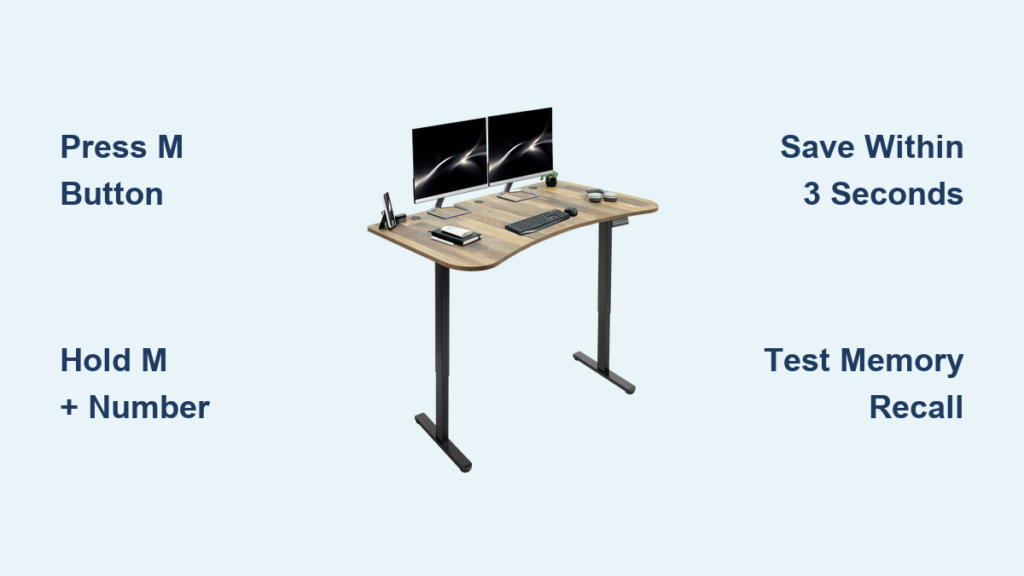
If you’ve just set up your VIVO electric sit-stand desk and want to save your ideal sitting and standing heights, programming the memory settings is the first step to a truly ergonomic workspace. The touch-screen controller on the DESK-V102E Series lets you store three custom heights and switch between them with a single tap. This guide covers every programming step, from saving your first position to troubleshooting common issues, so you can get the most out of your desk from day one.
Set Your Ideal Desk Height
Before programming, manually adjust the desk to your optimal ergonomic position for either sitting or standing.
Adjust Height Using Arrow Buttons
Press and hold the Up or Down arrow button on the touch-screen controller to move the desk smoothly. Release the button when you reach your desired height.
Pro Tips for Proper Ergonomics:
• When seated, your elbows should form a 90-degree angle while typing
• Your eyes should align with the top third of your monitor
• When standing, keep your wrists neutral and shoulders relaxed
Confirm Position Before Programming
Wait 2 to 3 seconds after stopping movement before programming. This prevents the desk from shifting slightly during the save process due to motor settling.
Critical Warning: Do not press the memory button while the desk is still moving. Always let it fully stop before saving your position.
Save Height to Memory
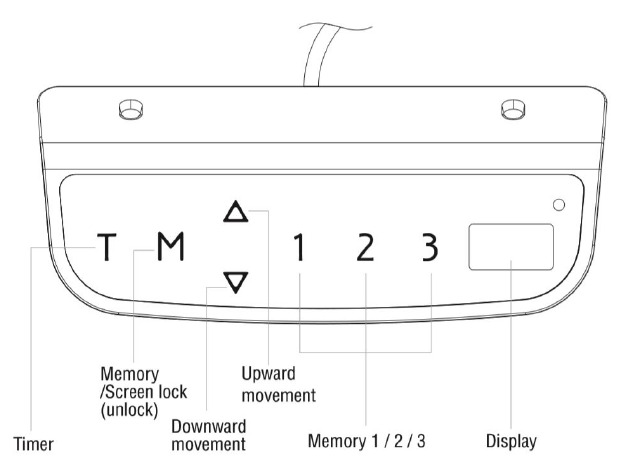
Once you’ve reached your perfect position, save it to one of the three available memory slots on your VIVO desk.
Press and Hold the M Button
Locate the M button (or S on some models) on the controller. Press and hold it until the display responds, usually within half a second.
Visual Confirmation: Some units briefly flash or darken the screen to confirm the M command is active.
Select Memory Slot 1, 2, or 3
Immediately after pressing M, tap one of the numbered buttons to assign the current height to that slot.
Recommended Slot Layout:
• Slot 1: Seated height (example: 28.5 inches)
• Slot 2: Standing height (example: 42 inches)
• Slot 3: Alternate position for collaborative mode or dual monitors
Timing Requirement: Complete the M plus number action within 3 seconds of stopping height adjustment. Delaying increases the chance of failure.
Recall Saved Positions
Switch between saved heights instantly without any manual adjustments needed on your VIVO desk.
Tap Number to Return to Height
To return to a programmed position, simply press the corresponding number on the controller. The desk will move up or down automatically to reach the stored height.
Anti-Collision Safety Feature
If the desk detects resistance during movement, such as hitting an object, it will stop and reverse slightly to prevent damage or injury.
Watch For: Uneven movement or repeated stalling may indicate misalignment or sync rod issues that require troubleshooting.
Use the Sit-Stand Reminder Timer
Stay active and avoid long sedentary periods with the built-in timer feature on your VIVO desk.
Activate Timer with T Button
Press the T button once to start the countdown. Each press adds 30 minutes, up to a maximum of 2 hours.
Example: Press T four times to set a full 2-hour cycle.
Listen for Alert Beep
When the timer ends, the controller emits one audible beep as a reminder to change positions.
Important: The desk does not move automatically. Only you can initiate height changes after the beep.
Reset or Disable Timer
Press T again after the beep to restart or cancel the timer. There is no need to wait. You can reset it at any time.
Pro Tip: Combine with smartwatch or app reminders for more personalized intervals throughout your workday.
Fix Common Programming Issues
Even with simple controls, users sometimes face glitches when saving or recalling positions on their VIVO desk.
Memory Not Saving
Cause: Delay between releasing the arrow button and pressing M plus number.
Fix:
1. Stop height adjustment
2. Immediately press M, then the number
3. Do not pause. Act within 2 to 3 seconds
Success Check: Recall the position by pressing the number. If it works, the save was successful.
Desk Moves Unevenly After Recall
Cause: Sync rod disconnected or misaligned during assembly.
Fix:
• Power off the desk
• Inspect the metal rod connecting both legs
• Ensure it is fully seated in both motor couplings
• Realign and power back on
Still Off: Contact VIVO support. Do not force adjustments.
Timer Not Beeping
Cause: Timer disabled or controller glitch.
Fix:
• Press T multiple times until the countdown starts
• If no response, unplug the desk for 30 seconds and retry
Note: There is no user-replaceable battery. The controller runs on main power only.
Grinding Noise During Movement
Cause: Internal motor gear wear, reported in early models with plastic gears.
Fix:
• Stop using the desk immediately
• Contact VIVO for a free replacement motor under warranty
Warranty Note: 3-year coverage applies even if purchased via Amazon or other retailers.
Optimize Desk Performance Long-Term
Keep your VIVO desk running smoothly for years with simple care and usage habits.
Avoid Overloading the Desk
Maximum load is 176 pounds (80 kg). Exceeding this strains the motor and may cause premature failure.
Weight Tip: Distribute weight evenly, especially with dual monitors or heavy equipment.
Clean Controller Regularly
Wipe the touch screen with a dry or slightly damp cloth. Avoid harsh chemicals.
Maintenance Schedule: Clean monthly or as needed.
Verify You Have the Latest Frame Revision
Older units shipped with a 2-tier leg system (minimum height: 28 inches), not the advertised 3-tier system (minimum height: 24.5 inches).
How to Check:
• Measure the lowest position. Below 25 inches means 3-tier (current revision)
• If stuck at 28 inches, contact VIVO for a replacement frame
User Report: Multiple customers confirm VIVO sends replacements overnight, even past one year of ownership.
Maximize Ergonomic Benefits
Programming your VIVO desk is not just about convenience. It is about protecting your health during long work sessions.
Alternate Between Sitting and Standing
Use the timer or personal habit to shift between sitting and standing every 30 to 60 minutes.
Health Insight: Studies show alternating postures improves circulation, focus, and long-term spinal health.
Assign Smart Memory Layouts
Use the three slots strategically for different work modes.
Recommended Memory Layout:
• Slot 1: Primary seated work height
• Slot 2: Standing work height
• Slot 3: Secondary setting such as drawing table or video calls
Bonus Use: Some users set Slot 3 to a clear desk height for cleaning or presentations.
Access Support and Warranty
VIVO backs its desks with strong customer service and a comprehensive warranty.
3-Year Warranty Coverage
The warranty includes:
• Motor
• Control box
• Frame components
Coverage Applies: To all purchase channels, including Amazon and third-party retailers.
How to File a Claim
- Email or chat with VIVO Support
- Provide order number, SKU, and photo or video of issue
- Receive replacement part, often within 1 to 3 days
Real Experience: One customer received a new motor overnight after reporting gear failure with no questions asked.
Final Setup Checklist
Ensure your VIVO desk is fully programmed and optimized before daily use.
Complete These Steps:
• Assembled securely with proper tabletop (¾ inch thick, 38 to 80 inches long)
• Set and tested all three memory positions
• Verified minimum height is 24.5 inches (confirms 3-tier legs)
• Tested timer function and alert beep
• Balanced load under 176 pounds
• Contacted VIVO if outdated revision received
Frequently Asked Questions About VIVO Desk Programming
How do I save a height position on my VIVO desk?
Adjust the desk to your desired height using the arrow buttons. Then press and hold the M button and immediately press one of the numbered buttons (1, 2, or 3) to save that height to memory. Complete this within 3 seconds of stopping the desk movement.
Why is my VIVO desk memory not saving?
The most common cause is waiting too long between releasing the arrow button and pressing M plus the number. Try adjusting the height again and immediately press M followed by your chosen number within 2 to 3 seconds.
How does the sit-stand timer work on VIVO desks?
Press the T button to activate the timer. Each press adds 30 minutes, up to 2 hours maximum. When the time expires, the controller beeps once to remind you to change positions. The desk does not move automatically.
Can I use my VIVO desk warranty if I bought it from Amazon?
Yes. VIVO honors its 3-year warranty for all purchase channels, including Amazon and other third-party retailers. Contact VIVO support with your order information to file a claim.
What should I do if my VIVO desk makes grinding noises?
Stop using the desk immediately and contact VIVO support for a replacement motor. This issue is typically covered under the 3-year warranty, and many users report receiving replacement parts within 1 to 3 business days.
How do I know if I have the old 2-tier leg system?
Measure your desk’s lowest height position. If it stops at 28 inches, you have the older 2-tier revision. The current 3-tier system reaches a minimum of 24.5 inches. Contact VIVO for a replacement if you received an outdated model.
Key Takeaways for Programming Your VIVO Desk
Programming your VIVO desk memory settings takes just seconds once you understand the simple M plus number sequence. Save your preferred sitting height in Slot 1, standing height in Slot 2, and a third position in Slot 3 for maximum flexibility. Use the T button timer to remind yourself to switch positions every 30 to 60 minutes for better posture and health.
If you encounter issues, the most likely cause is timing. Save your position immediately after stopping desk movement, within 2 to 3 seconds. For hardware problems like grinding noises or uneven movement, VIVO’s 3-year warranty covers motor, control box, and frame components regardless of where you purchased the desk.
Now that you know how to program your VIVO desk, take a few minutes to save your ideal heights. One tap is all it takes to switch between sitting and standing throughout your workday.





