
Is your desk wobbling every time you type? Does it creak under the weight of your monitor, or worse has part of the surface cracked or come loose? You’re not alone. Desk instability, loose joints, damaged surfaces, and mechanical failures in standing desks are among the most common home office issues. The good news: most problems can be fixed quickly and affordably with basic tools and the right techniques.
This guide walks you through diagnosing and fixing every major desk issue, from tightening loose screws and reinforcing shaky legs to repairing water-damaged surfaces, resetting motorized standing desks, and upgrading weak components. Whether you own an IKEA flat-pack, a solid wood workstation, or a high-end adjustable desk, you’ll learn exactly how to restore stability, extend lifespan, and prevent future damage without spending hundreds on a replacement.
Diagnose the Problem First
Before grabbing tools, identify what is actually wrong with your desk. Misdiagnosing leads to wasted effort and temporary fixes that do not address the root cause.
Perform a Shake Test
Flip the desk upside down if possible. Hold each leg and frame joint and shake firmly side-to-side and front-to-back. Watch where movement occurs:
- Side-to-side sway indicates lateral instability, also called racking
- Rocking on the floor suggests uneven legs or flooring issues
- Surface flexing means weak support or overloaded span
- Creaking noises point to loose joints or dry friction
- Desktop lifting means failed adhesive or fasteners
Use a spirit level on the surface in both directions to check for unevenness. This simple diagnostic step tells you exactly where to focus your repair efforts.
Stabilize a Wobbly Desk

Wobbling is the number one complaint about desks, and it is often the easiest problem to fix. Most instability stems from loose fasteners, missing bracing, or uneven floors.
Tighten Every Fastener
Over time, screws, bolts, and cam locks loosen from daily use. Turn the desk upside down and systematically tighten every screw, bolt, and cam lock you find. Avoid over-tightening in particleboard because it accelerates stripping. Apply Loctite 222, a non-permanent thread locker, to prevent future loosening. Mark each fastener with a pen as you tighten it to ensure none are missed.
Level the Desk on Uneven Floors
Even a one-eighth inch gap under one leg causes major rocking. For adjustable feet, rotate counterclockwise to raise and clockwise to lower. For non-adjustable legs, add screw-in leveling glides, felt pads, or rubber shims. On thick carpet, use spiked glides or place a rigid chair mat to reach the subfloor. A quick fix is to cut a shim from cardboard or wood and slide it under the high side.
Reinforce Weak Joints with Brackets
Loose leg-to-frame or leg-to-desktop joints need mechanical reinforcement. Use L-brackets that are two to three inches at leg junctions, corner gussets or mending plates for L-desks, and mount all brackets underneath for a clean look. Use coarse-thread confirmat screws for particleboard or MDF, with length at least one and a half times the material thickness. Always drill pilot holes slightly smaller than the screw core to prevent splitting. Reinforce both sides of the joint for balanced strength.
Add Cross-Bracing for Full Rigidity
If your desk still wobbles after tightening, it likely lacks lateral support. Install a steel rail or hardwood slat between front and rear legs and secure with lag screws and corner brackets. For floating desks, anchor to the wall with an L-bracket into a stud. This eliminates racking, or side-to-side sway, permanently.
Repair Cracked or Split Desk Surfaces
Damage happens, especially with kids, moving, or accidental impacts. The repair method depends on the material and severity of the damage.
Fix Small Cracks in Wood or MDF
Gather wood glue such as Titebond III, a syringe or squeeze bottle, clamps or heavy books, wood filler such as Minwax High-Performance, and sandpaper ranging from sixty to two-twenty grit. Clean the crack with a utility knife and widen it slightly for glue penetration. Inject glue deep into the joint and clamp tightly for twenty-four hours. Fill any remaining gaps with wood filler and sand smooth. Refinish with matching stain or touch-up pen. For large splits, reinforce with a hidden wood spline or metal plate underneath.
Fix Water-Damaged or Swollen MDF
MDF swells when wet, which is common near windows or around drinks. Dry completely, which can take several days in humid conditions. Scrape off bubbled laminate and apply wood glue to flatten remaining layers. Clamp if possible. Fill damaged areas with auto body filler, which is more durable than standard wood filler. Sand with one-twenty to two-twenty grit paper, then prime and repaint or apply moisture-resistant sealant. Prevent future damage by keeping humidity between thirty and fifty percent.
Quick Cosmetic Fix for Shattered Particleboard
When you cannot replace the top, you can make it look better, though this is cosmetic only and not structural. Align broken pieces as closely as possible. Apply super glue with a toothpick and press for five to ten minutes. Fill gaps with a glue-sawdust paste. Sand smooth first with coarse sixty to eighty grit, then fine two-hundred grit. Color-match with a permanent marker or crayon. Seal with clear nail polish for shine and protection.
Reattach a Loose or Lifting Desktop

A creaking or lifting top means the glue or fasteners have failed. You have several repair options depending on your situation.
Inject Epoxy Without Removing the Top
This method works best for desks where removal risks breaking the top. Use two-part thirty-minute epoxy, a syringe, and clamps or sandbags. Pry the gap slightly with a putty knife. Inject epoxy deep into the joint. Clamp or weight down until cured according to package instructions. Wipe excess before it hardens. Epoxy bonds to old glue layers where wood glue often fails on aged surfaces.
Use Contact Cement for Laminate Tops
Contact cement provides a strong, no-clamp solution for veneer or laminate lifts. Apply contact cement to both surfaces and let dry until tacky, typically ten to fifteen minutes. Press together firmly, as no clamping is needed. Wipe excess with mineral spirits.
Fix a Standing Desk That Will Not Move
Motorized desks stop working due to software glitches, obstructions, or power issues. Most problems are fixed with simple troubleshooting steps.
Perform a Full Reset
Clear all items off the desk. Press and hold the down button until the desk reaches the bottom. Keep holding ten to fifteen seconds after it stops, listening for a double-click. Release the button and the desk will recalibrate and rise. Always lower your standing desk fully before moving or adjusting legs to prevent future calibration issues.
Check Power and Cables
Plug directly into the wall, not a power strip. Test the outlet with another device to confirm it works. Unplug and reseat all connectors until they click into place. Loose cables are a common cause of standing desk failure.
Reset Height Limits
If the desk stops short when rising or will not go down fully, you need to reset the height limits. To set the maximum height, lower slightly, hold the memory button until it flashes, raise to the desired height, and save. To reset the lower stop, hold the down button past the lowest point.
Repair Stripped Screw Holes
Stripped screw holes are common in particleboard desks after repeated assembly and disassembly. The fix depends on how much material remains.
Use Wood Glue and Toothpicks
Insert three to four wooden toothpicks into the hole, coated in wood glue. Break them off flush with the surface. Let dry for four to six hours. Re-drill a pilot hole and reinsert the screw. For more fill material, use dowels or matchsticks instead of toothpicks.
Upgrade to Confirmat Screws
Confirmat screws are designed specifically for engineered wood. They feature coarse threads that bite into soft material and wide ribs that resist stripping. Use one and a half inch length for standard three-quarter inch panels. Always drill a pilot hole slightly smaller than the screw core, and avoid drilling near edges where splitting occurs.
Fix Sticking or Misaligned Drawers
Drawer problems are frustrating but usually simple to fix with basic maintenance.
Clean and Lubricate Slides
Remove the drawer. Wipe runners with a damp cloth and dry completely. Lubricate with paraffin wax, which is the best option, or silicone spray. Avoid oil-based lubricants because they attract dust and debris.
Realign Drawer Glides
If the drawer sags or rubs, tighten the mounting screws on both sides. Adjust side glides using the screw slots. Ensure both sides move smoothly before reinserting the drawer.
Upgrade Weak Desk Legs
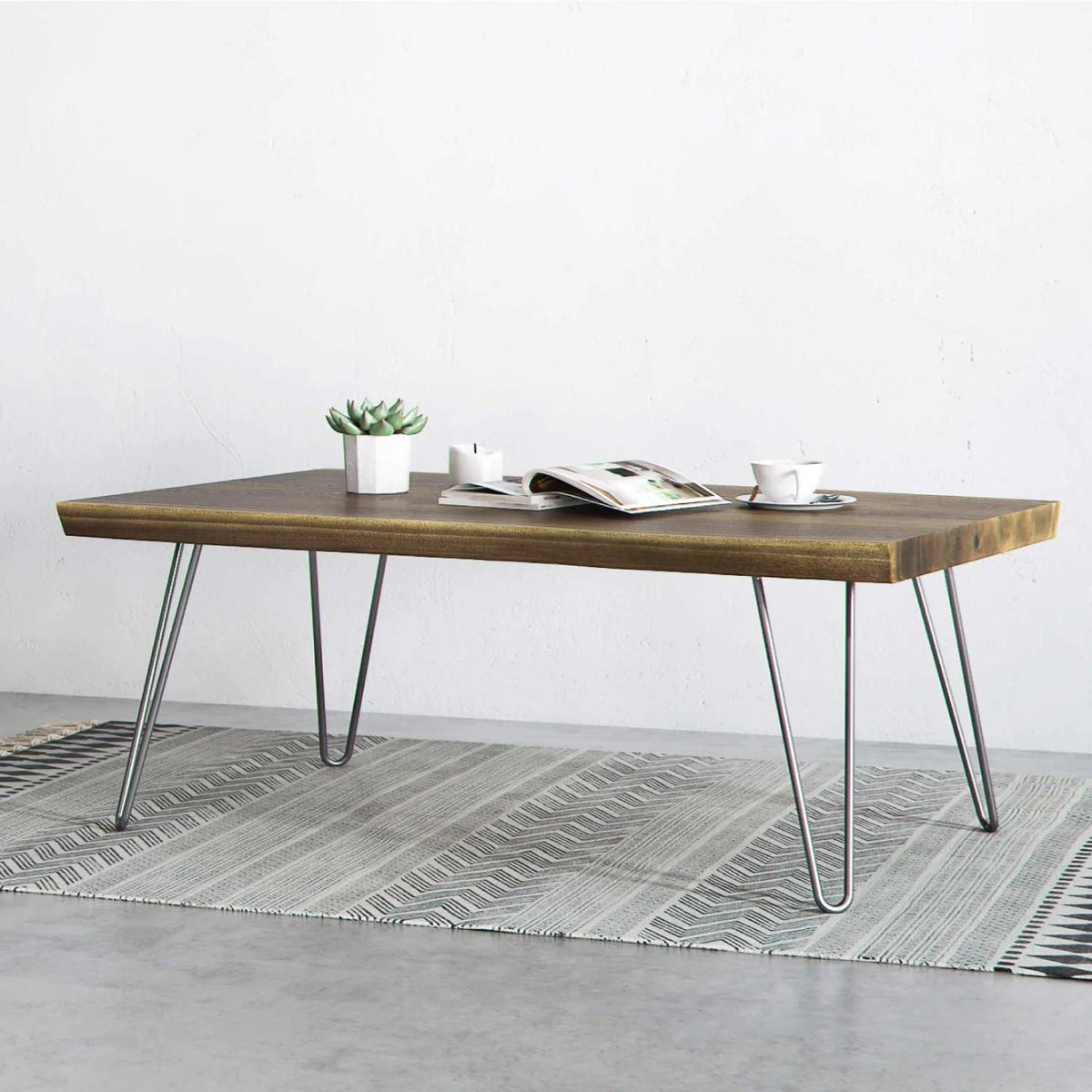
Flimsy legs cause wobble and reduce the overall lifespan of your desk. Sometimes replacement is more cost-effective than repair.
Replace with Sturdy Hairpin or X-Frame Legs
The Hairpin Leg Co. offers steel construction with floor-protecting rubber feet and high weight capacity. Their legs have a four point nine-two star rating with nearly four thousand reviews and come with a sixty-day guarantee. Use mounting plates for secure attachment to MDF tops. Expect to pay roughly fifty to one hundred dollars for a set, which is often cheaper than buying a new desk.
Prevent Future Damage
A little maintenance goes a long way toward keeping your desk stable and functional for years.
Semi-Annual Desk Checkup
Every six months, perform a shake test to catch early wobble. Retighten all fasteners and inspect for cracks, swelling, or wear. Lubricate drawer slides and check cables and power connections on standing desks. More frequent checkups may be needed for heavy-use desks in gaming setups or busy offices.
Control Your Environment
Keep humidity between thirty and fifty percent to prevent wood movement. Avoid placing your desk near windows, heaters, or air conditioning vents. Use coasters, mouse pads, and monitor risers to protect the surface from spills and scratches.
Manage Weight Wisely
Place heavy items over legs rather than mid-span to avoid unnecessary stress. Never exceed the manufacturer’s weight limit, and use a reinforcement plate under monitor arms to distribute clamping pressure.
When to Replace Instead of Repair
Some desks are not worth fixing. Replace if particleboard has crumbled or delaminated, if a standing desk motor or control box has failed and is out of warranty, if repeated repairs do not hold, or if the desk compromises ergonomics or safety. A new IKEA tabletop costs around twenty dollars, which is often cheaper than professional repair.
Frequently Asked Questions About How to Fix a Desk
How often should I tighten desk screws?
Check and tighten desk screws every six months, or sooner if wobble is detected. Using thread-locker on fasteners can extend the time between tightenings.
Can I use wood glue on an assembled desk?
Yes, you can inject wood glue using a syringe or by loosening the connection slightly first. Always pair glue with mechanical fasteners for the strongest bond.
Why does my L-shaped desk wobble more?
L-shaped desks have more joints and longer unsupported spans, which increases flex. Reinforce the corner with a gusset or mending plate and balance your load evenly across both sections.
Is it safe to drill new holes in particleboard?
Yes, but always use a pilot hole slightly smaller than the screw core. Avoid drilling near edges to prevent splitting.
Will a monitor arm make my desk wobbly?
A monitor arm can cause wobble due to lever action. Use a reinforcement plate and ensure your desk is well-braced before installing one.
How do I fix a wobbly desk on carpet?
Use spiked glides or place a rigid chair mat to reach the subfloor beneath the carpet. Adjust feet to bite through the padding for solid contact.
Key Takeaways for Fixing Your Desk
Most desk problems can be solved with basic tools and inexpensive materials. Tightening all fasteners fixes wobbling in the majority of cases, while cross-bracing and L-brackets provide permanent stability for racking issues. Water-damaged MDF requires thorough drying and filler before refinishing, but the repair is straightforward. Standing desk motor issues are resolved with a full reset in eighty percent of cases. Cosmetic repairs hide damage but do not restore structural integrity, so know when replacement makes more sense than repair. DIY fixes typically cost ten to forty dollars and extend desk life by one to three years, making them far more economical than buying new.





