
Standing at a standing desk can boost energy, improve posture, and reduce the health risks of prolonged sitting, but only if done correctly. Many people switch to standing workstations hoping for instant relief from back pain or fatigue, only to develop new aches in their legs, feet, or neck. The problem is not the desk; it is how they are using it. Poor standing posture, incorrect desk height, and static positioning can turn a health-promoting tool into a source of strain.
The key to standing safely and effectively lies in ergonomic alignment, frequent movement, and smart transitions between sitting and standing. This guide breaks down exactly how to stand at a standing desk, step by step, based on biomechanics and clinical recommendations. You will learn how to align your body, set up your workstation, avoid common mistakes, and build a sustainable routine that supports long-term comfort and productivity.
Set Your Standing Desk to Elbow Height

Your desk height is the foundation of proper standing posture. When the desk is too high or too low, your body compensates with poor alignment that leads to strain over time.
Find Your Ideal Desk Height
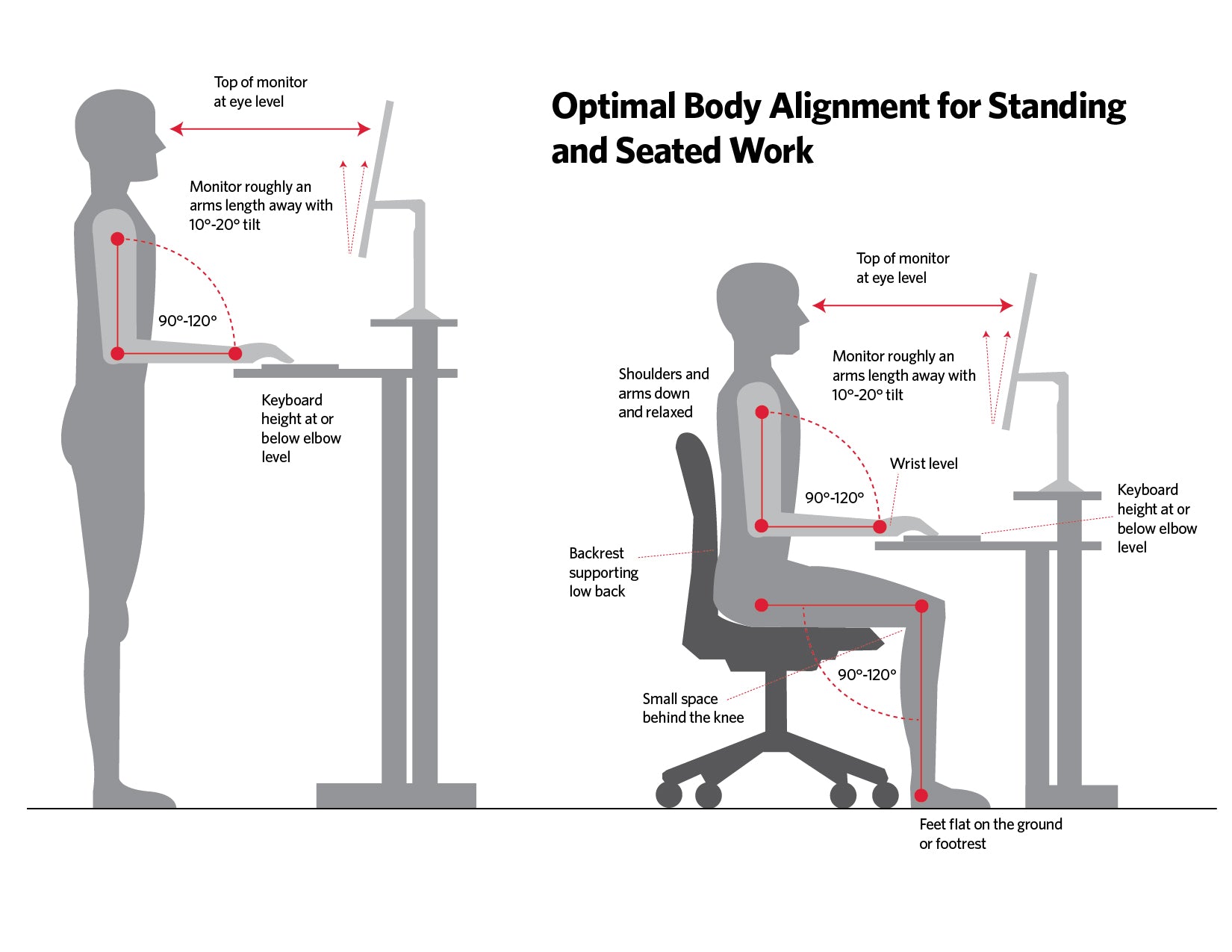
Stand naturally with your shoulders relaxed and arms hanging at your sides. Raise or lower your sit-stand desk until the work surface aligns with your elbows when bent at a 90-degree angle. This neutral position keeps your shoulders relaxed and your wrists straight during typing.
Height recommendations by stature provide a helpful starting point. Users under 5’5″ should aim for 36 to 38 inches. Those between 5’6″ and 6’0″ typically need 39 to 42 inches. Taller users may require 43 to 47 inches. Adjustability is essential, so avoid fixed-height desks unless they are precisely matched to your body dimensions.
Position Your Monitor at Eye Level
A poorly placed monitor causes neck strain, one of the most common complaints among standing desk users. Proper screen position protects your cervical spine and prevents forward head posture.
Optimize Screen Placement and Distance
Place the top of your screen at or slightly below eye level. This ensures your gaze remains level rather than tilting your head up or down. Position the monitor 20 to 28 inches from your eyes, roughly an arm’s length away. Tilt the screen 10 to 20 degrees upward to maintain a neutral neck angle.
Looking down at a laptop screen increases neck load by up to 10 pounds per inch of forward head tilt. Use a laptop riser with an external keyboard and mouse to avoid this strain. Monitor arms allow quick adjustments when switching between sitting and standing.
Keep Wrists Straight and Neutral
Typing posture changes when standing. Your wrists naturally extend more than when seated, and without correction, this leads to discomfort and repetitive strain injuries.
Align Keyboard and Mouse Properly
Align the keyboard with elbow height so your wrists stay neutral during typing. Place the mouse next to the keyboard within easy reach, avoiding any stretching that strains your shoulder. Use a gel wrist pad or adjustable tray only if needed to maintain alignment, not as a permanent resting place.
Your hands should float freely over the keys rather than resting heavily on wrist support. Avoid placing the keyboard too high or too low, as both force awkward angles that stress tendons in the carpal tunnel area.
Distribute Weight Evenly on Both Feet
How you stand matters as much as how long you stand. Poor foot positioning leads to fatigue, joint stress, and postural imbalance throughout your body.
Stand with Stable, Balanced Posture
Stand with your feet shoulder-width apart, flat on the floor. Distribute weight evenly across both feet rather than shifting to one side. Keep your knees slightly bent at 5 to 10 degrees, never locked. Locking your knees reduces circulation and increases joint pressure.
Incorporate subtle micro-movements throughout your standing time. Shift your weight between feet, sway gently, or do mini calf raises. These small movements keep blood flowing and muscles engaged without disrupting your work.
Engage Your Core and Maintain Natural Spine Curves

Your spine thrives in its natural S-curve with slight inward lumbar, outward thoracic, and inward cervical curves. Standing incorrectly flattens or exaggerates these curves, leading to disc strain and discomfort.
Support Your Lower Back Naturally
Stand tall with your ears over your shoulders, shoulders over your hips, and hips over your ankles. Engage your core muscles lightly, not rigidly, to support your lower back. Avoid slouching forward or over-arching your lower back into hyperlordosis.
Reset your posture every time you switch positions. It takes seconds and prevents cumulative strain. Think of standing not as being still, but as active stability supported by small, continuous adjustments.
Use an Anti-Fatigue Mat on Hard Floors
Standing on concrete, tile, or hardwood accelerates fatigue. An anti-fatigue mat helps, but only if used correctly and combined with movement.
Choose and Use the Right Mat
Select a firm, textured mat between 0.5 and 0.75 inches thick with a non-slip base. Avoid overly soft or unstable mats, as they can worsen foot pronation and increase knee stress. Use the mat to encourage movement, not static standing.
Sway, shift, or march in place while working. The mat enhances the micro-movements that boost circulation. Even with a mat, never stand longer than 60 minutes without a break or position change.
Alternate Sitting and Standing Every Hour
Standing all day is not healthier than sitting all day. The goal is movement variability, not replacement of one static posture with another.
Follow a Balanced Work Ratio
Aim for a 1:1 or 2:1 sit-to-stand ratio, meaning 1 hour of standing for every 1 to 2 hours of sitting. Start with 15 to 20 minutes of standing per hour, increasing gradually over 2 to 4 weeks. Never stand continuously for more than 60 minutes.
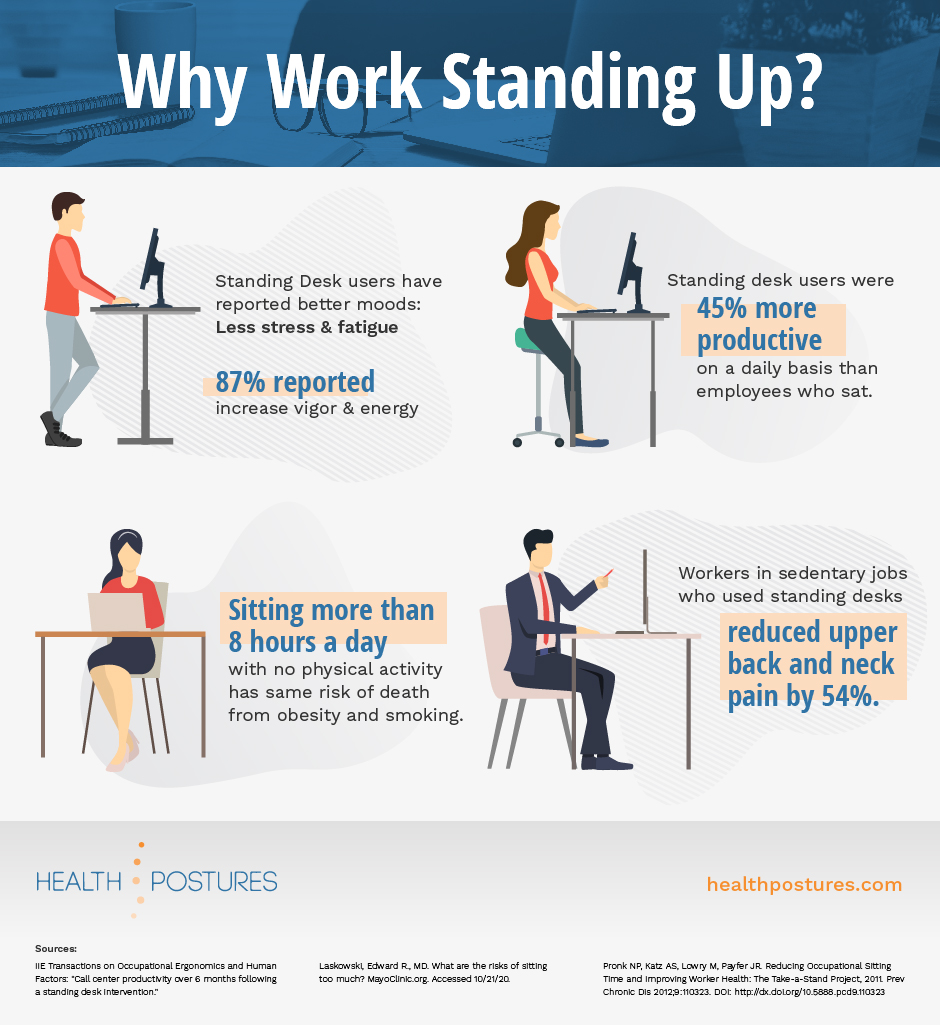
The CDC recommends changing positions every 30 minutes to reduce back pain by up to 54 percent. Use a timer or app to remind you to switch. Reset your posture each time, checking monitor height, wrist angle, and shoulder position.
Move Frequently While Standing
Even perfect posture becomes harmful when held too long. Your body needs motion to stay healthy and to maintain circulation and muscle engagement.
Break Static Postures with Micro-Movements
Shift your weight between feet every few minutes. Sway side to side or march in place subtly. Do calf raises or gentle leg shakes to keep blood moving. Take active breaks every 30 to 60 minutes to walk around the room and stretch your neck, shoulders, hamstrings, and wrists.
Movement increases dopamine and serotonin, improving focus, mood, and mental clarity. Think of your standing desk as a movement hub rather than a static station.
Wear Supportive Shoes or Go Barefoot on Mats
What you wear on your feet affects your entire posture and joint health. Footwear choices matter significantly during prolonged standing.
Choose Footwear That Supports Natural Alignment
On hard floors, wear flat, flexible, supportive shoes like minimalist work shoes or cushioned loafers. Avoid high heels, stiff soles, or unsupportive flats. On anti-fatigue mats, barefoot standing is acceptable and can improve balance and foot strength.
Poor footwear increases stress on your knees, hips, and lower back, especially during prolonged standing. If you stand for hours, consider standing-specific work shoes with arch support and shock absorption.
Add Arm Supports for Shoulder Relief
Typing and mousing without forearm support increases strain on your shoulders and wrists. Arm supports help distribute load and reduce discomfort during extended standing work.
Reduce Upper Body Strain with Ergonomic Aids
Use arm supports or forearm rests attached to your desk. They reduce pressure on the carpal tunnel and ulnar nerve. These supports are especially helpful if you experience shoulder, neck, or wrist pain during standing work.
Position supports so they hold your forearms without lifting your elbows. Your shoulders should remain relaxed, not elevated or hunched. Avoid soft wrist rests that force your wrists into flexion.
Avoid Common Standing Desk Mistakes
Many users unknowingly sabotage their standing desk setup with habits that undermine potential benefits. Recognizing these pitfalls helps you maintain proper form.
Skip Common Pitfalls That Undermine Benefits
Locking your knees reduces circulation and strains joints. Leaning your head forward doubles neck load and compresses spinal discs. Crossing legs or shifting weight to one side causes hip imbalance and back pain. Using a laptop without accessories forces your neck down and wrists up. Standing too long without breaks increases leg fatigue and varicose vein risk.
The goal is not to stand more but to move more and sit less. Prolonged standing raises risks of foot, knee, and circulatory issues just as prolonged sitting does.
Listen to Your Body’s Signals
Your body tells you when something is wrong. Ignoring early signs of discomfort leads to chronic pain and injury.
Recognize Early Signs of Discomfort
Tingling or numbness in your hands indicates check your wrist alignment. Lower back ache means reassess your spine curves and core engagement. Foot or leg fatigue suggests adding a mat, changing shoes, or sitting down. Neck pain means rechecking your monitor height and head position.
If discomfort lasts more than 10 to 15 minutes, adjust your setup or take a break. Persistent pain may require an ergonomic assessment by a physical therapist or occupational specialist.
Build a Sustainable Standing Routine
Your body adapts over time. Rushing the transition leads to burnout and discomfort rather than lasting benefit.
Start Slow and Progress Gradually
During week one, stand 15 to 20 minutes per hour. During weeks two and three, increase to 30 to 45 minutes per hour. By week four, aim for 2 to 4 hours total standing per day, split into intervals.
Most users report mild leg or back fatigue in the first 1 to 2 weeks. This is normal as postural muscles strengthen and typically fades. Track your progress with a habit app and celebrate consistency rather than perfection.
Frequently Asked Questions About Standing Desks
How long should I stand at my standing desk?
Start with 15 to 20 minutes per hour and gradually increase to 2 to 4 hours total per day. Never stand continuously for more than 60 minutes without a break. The goal is movement variety, not maximum standing time.
What is the ideal height for a standing desk?
Your desk should be level with your elbows when your arms are bent at 90 degrees while standing. For most people, this falls between 39 and 42 inches, though height varies significantly based on your stature.
Should I wear shoes while using a standing desk?
Wear supportive, flat-soled shoes on hard floors. Avoid high heels, stiff soles, or unsupportive footwear. If using a quality anti-fatigue mat, barefoot standing is acceptable and can improve foot strength and balance.
Can standing desks cause back pain?
Standing desks can cause back pain if used with poor posture or stood for too long without movement. Proper alignment, an anti-fatigue mat, and alternating between sitting and standing help prevent discomfort.
Do I need an anti-fatigue mat?
Yes, if standing on hard floors like concrete, tile, or hardwood. A firm, textured mat between 0.5 and 0.75 inches thick reduces leg fatigue and encourages micro-movements that boost circulation.
How often should I switch between sitting and standing?
Alternate every 30 to 60 minutes throughout your workday. The CDC recommends changing positions every 30 minutes to reduce back pain by up to 54 percent. Use timers or apps to remind you.
Key Takeaways for Standing Smarter at Your Desk
Standing at a standing desk is not about endurance. It is about alignment, movement, and balance. Set your desk at elbow height to prevent shoulder and wrist strain. Position your monitor with the top at eye level to protect your neck. Keep your wrists straight and your feet shoulder-width apart with knees slightly bent. Use an anti-fatigue mat on hard floors and alternate sitting and standing every hour. Move every 30 minutes to boost circulation and maintain focus. Wear supportive shoes and avoid static standing for extended periods.
The best posture is the next posture. Do not aim to stand all day. Aim to move more, sit less, and stand smarter. With the right setup and habits, your standing desk becomes a powerful tool for health, energy, and productivity without the pain.





