
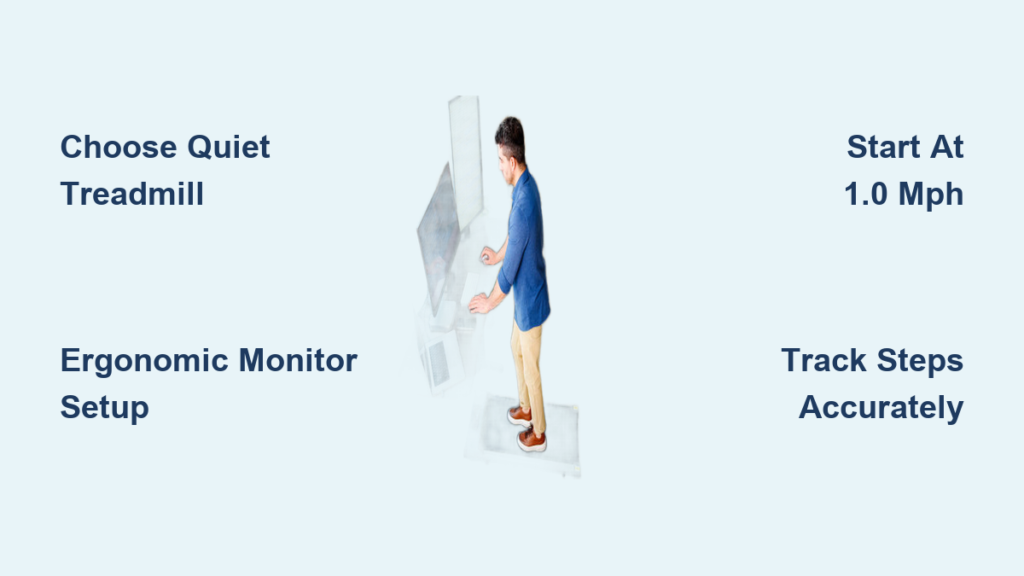
Sitting for hours at a desk doesn’t have to be the default. If you’re looking to set up a treadmill desk, you’re not just investing in fitness, you’re upgrading your entire workday. Prolonged sitting is linked to increased risks of heart disease, insulin resistance, and chronic back pain. A treadmill desk combats these dangers by letting you walk slowly while working, boosting circulation, focus, and calorie burn without sacrificing productivity.
This guide walks you through every step of creating a functional, ergonomic, and sustainable treadmill desk setup. You’ll learn how to choose the right treadmill, integrate it with your desk, optimize your posture, track steps accurately, and avoid common pitfalls.
Choose the Right Treadmill for Continuous Walking
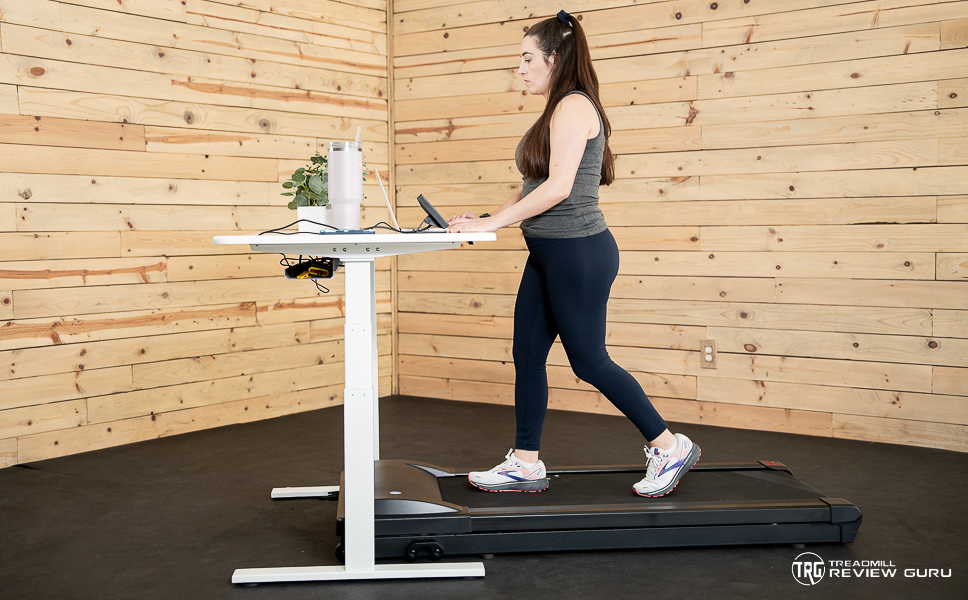
Your treadmill is the foundation of your setup. Not all models are built for walking while working, many are designed for high-intensity running, which leads to noise, instability, and premature wear when used at low speeds for hours each day.
Pick a Durable Motor for Low-Speed Use
Look for treadmills that support continuous low-speed use between 0.5 and 2.6 mph. Lightweight motors found in budget Horizon or Weslo models may fail after a few months of daily use. Opt for commercial-grade or office-rated motors, such as those in the LifeSpan TR1200i or Sole F85, which handle 1 to 5 hours of daily walking without overheating.
Avoid treadmills with minimum speeds above 1.0 mph because smooth, slow walking is essential for typing and maintaining focus. The ideal machine lets you walk at speeds slow enough to read documents without bouncing.
Prioritize Quiet Operation and Incline
If you work in a shared space, noise matters significantly. Under-desk walking pads like the Lifepro Timber Trek or Sperax Treadmill are designed for office environments, running quietly at up to 3.8 mph while producing minimal motor noise.
Incline is a game-changer for calorie burn. A 10% incline nearly doubles calorie burn without increasing perceived effort. Models like the Exerpeutic 2000 WorkFit offer incline adjustment and fold for storage, making them ideal for compact spaces where the treadmill needs to be rolled away when not in use.
Consider Used or Budget Options
You don’t need to spend $1,500 to start. Many users successfully build treadmill desks using secondhand machines from Craigslist, Freecycle, or Facebook Marketplace. A budget Redliro treadmill purchased for $180 lasted over 9 months with daily 90-minute use.
Just ensure the treadmill has no loud grinding noises, supports your weight, can run continuously at low speeds, and fits under or beside your desk. The key is testing the machine at your intended walking speed before committing to the setup.
Select Your Desk Configuration

Your desk must accommodate the treadmill while supporting proper ergonomics. There are three proven setups: DIY shelf, adjustable standing desk, or all-in-one system.
Build a DIY Shelf or Use a SurfShelf
The most budget-friendly option is a custom wooden shelf or SurfShelf mounted on the treadmill’s frame. These hold laptops, keyboards, and mice securely without requiring a separate desk purchase.
The advantages include costs under $100, easy installation, and lightweight construction. The drawbacks are limited adjustability and potential wobble if not secured properly. Use magic arm clamps and tripod mounts to stabilize your keyboard and position it at a neutral wrist angle that prevents strain during long typing sessions.
Pair with an Adjustable Standing Desk
For long-term comfort, combine your treadmill with a height-adjustable standing desk like the Rebel Desk or UPLIFT V2. Ensure the desk has no front crossbar, otherwise the treadmill won’t fit underneath properly.
This setup lets you walk, stand, or sit interchangeably throughout the day. You can fine-tune desk height for optimal posture and use full-size monitors and peripherals. Simply roll the treadmill in when you want to walk, then slide it out for sitting or standing breaks.
Go All-In-One with Pre-Built Treadmill Desks
If convenience is key, consider an all-in-one treadmill desk like the LifeSpan TR1200-DT5 or Exerpeutic 2000 WorkFit. These units offer plug-and-play setup with stable, integrated design and large workspace.
The trade-offs include higher cost ranging from $750 to $1,500 or more. The LifeSpan model lacks incline function, which limits calorie burn potential. The Exerpeutic has a shorter deck that may not suit taller users, so test the dimensions before purchasing if you are over six feet tall.
Optimize Monitor and Screen Placement

Poor screen positioning causes neck strain and reduces walking comfort. Your eyes should look straight ahead at monitor top level, not down at a laptop screen.
Use External Monitors at Eye Level
Avoid typing on a laptop screen because it forces you to look down, straining your neck. Instead, use one or more external monitors mounted on wall arms like the Ergotron LX.
Position the monitor with the top edge at or slightly below eye level, 20 to 30 inches from your face, and tilted slightly upward. For dual monitors, place your primary screen center-aligned and the secondary off to the side at a comfortable viewing angle.
Extend Your Desktop with iPad or Sidecar
Mac users can use Sidecar to turn an iPad into a secondary monitor. Place the iPad below eye level on the treadmill shelf to reduce neck strain while maintaining visibility.
With Sidecar, your mouse moves seamlessly between Mac and iPad without extra hardware needed. This works great for email, notes, or chat apps that don’t require your full attention. Windows users can achieve similar functionality using Duet Display.
Set Up Ergonomic Input Devices
Typing while walking requires stable, properly positioned input devices that won’t slide around as the treadmill belt moves beneath you.
Use a Split, Tented Keyboard
A split ergonomic keyboard like the Kinesis Freestyle or Logitech ERGO K860 keeps wrists neutral and reduces carpal tunnel risk. Mount it on a wooden board strapped to treadmill handles, a detachable tray with magic arms, or a full desk surface for the best precision.
Avoid wrist rests because they increase pressure on the median nerve. Instead, hover-type with wrists slightly elevated above the keyboard surface to maintain neutral alignment.
Choose the Right Mouse Solution
Using a mouse on a shaky shelf is frustrating and imprecise. Better options include the laptop trackpad which is most stable, a vertical mouse on a stable desk surface, or a mouse mounted on a swing arm.
If you’re coding or designing, reserve walking for tasks that don’t require precise cursor control. Save mouse-heavy work for sitting or standing desk sessions when you have a stable surface.
Start Walking: Speed, Incline, and Duration
You don’t need to walk fast to benefit. The goal is sustainable, low-impact movement that supports focus, not exhaustion or heavy sweating that ruins your work clothes.
Begin at 1.0 to 1.5 mph
Start slow. Most new users find 1.0 to 1.5 mph comfortable for typing and reading. At this speed, you maintain balance easily, your vision stays stable for screen reading, and cognitive load remains low enough for productive work.
Avoid speeds above 2.5 mph because they cause dizziness, eye strain, and reduced work efficiency. The sweet spot for most users is between 1.2 and 2.0 mph once acclimated.
Gradually Increase Incline
Start flat at 0 to 1.5% incline, then build up to 5 to 10% over weeks. A 10% incline can double calorie burn without increasing perceived effort.
For a 217-pound person, walking at 2 mph with 0% incline burns approximately 260 calories per hour. At 10% incline, that jumps to 544 calories per hour. That’s nearly one pound of fat lost per week with modest diet control.
Walk 30 Minutes to 2 Hours Daily
Don’t aim for eight-hour marathons. Most users sustain 30 to 60 minutes per day when starting, 1 to 2 hours per day after adaptation, and up to 4 to 5 hours for light tasks like reading or emails. One dedicated user logged 23,000 steps in a single day using multiple walking blocks throughout their workday.
Wear the Right Shoes and Clothing
Comfortable attire prevents blisters, chafing, and fatigue that derail your walking sessions.
Wear Walking or Running Shoes
Use supportive shoes like Brooks or Hoka designed for walking. Avoid dress shoes because they lack cushioning and cause foot pain over time. If using an under-desk walking pad for short sessions, socks or slippers may suffice.
Choose Loose-Fitting Clothes
Opt for gym shorts, loose slacks, or stretchable fabrics that allow full range of motion. Avoid tight jeans because they restrict movement and cause thigh chafing during long walks. The goal is comfort that lets you focus on work, not adjusting your waistband.
Track Steps Accurately
Most wearables undercount steps when you’re walking at a desk because your arms aren’t swinging naturally through the stride cycle.
Why Standard Wearables Fail
Apple Watch captures only 20 to 30% of actual steps when your arms remain relatively stationary. Fitbit and Oura Ring show similar inaccuracies. Even Indoor Walk mode doesn’t fix the underlying detection issue.
Fix Step Tracking with Smart Solutions
| Solution | How It Works |
|---|---|
| iPhone in pocket | Uses motion sensors accurately if phone stays on you |
| Ankle-mounted Apple Watch | Highly accurate but hard to check notifications |
| Rechargeable pedometer | Clip-on device requires manual logging |
| Treadmill with Apple Health sync | Auto-logs steps but limited to premium models |
Automate Logging with iOS Shortcuts
Create a custom Shortcut to manually log steps into Apple Health. Open the Shortcuts app, tap the plus button, add the Log Workout action, set activity to Walking, add Ask for Input to enter your step count, and save as Log Treadmill Steps.
The critical fix is opening Apple Health, going to Steps, scrolling to Data Sources and Access, tapping Edit, and dragging Shortcuts to the top of the list. Otherwise, your manual entries get overwritten by your Apple Watch data.
Match Tasks to Walking Intensity
Not all work is suited for the treadmill. Use walking for the right tasks at the right time to maintain productivity.
Ideal Tasks for Treadmill Use
Walking works well for reading documents or articles, responding to emails, attending audio-only meetings, listening to podcasts or audiobooks, and light administrative or data entry. These low-cognitive tasks benefit from the flow state walking induces, with users reporting enhanced creativity and focus.
Avoid These Tasks While Walking
Avoid video calls with camera on because it’s distracting to others, coding or deep writing for most beginners, presentations or screen sharing, and tasks requiring precise mouse control. After full adaptation, some users walk during coding or writing, but start with easier tasks.
Maintain Your Treadmill Desk
A well-maintained treadmill lasts years. Neglect leads to noise, belt slippage, and motor failure that ends your walking work sessions.
Lubricate and Clean Regularly
Apply treadmill belt lubricant every 3 to 6 months depending on usage frequency. Wipe down the deck and handrails weekly to remove sweat and dust. Vacuum under the treadmill regularly to prevent debris buildup that affects motor cooling.
Tighten the Belt and Check Placement
Use the included tool to tighten the belt if it slips or feels loose during walking. Always place the treadmill on a flat, hard surface, and use a protective mat if operating on carpet to prevent dust infiltration into the motor compartment.
Replace Worn Parts Early
A SurfShelf lasts approximately 4 years with moderate use. Walking pads wear out after 2 to 3 years with daily use. Motors degrade with heavy daily use, so monitor performance and budget for replacement after 3 to 5 years depending on quality.
Maximize Long-Term Success
The key to treadmill desk success isn’t speed or hours, it’s consistency, ergonomics, and habit formation that keeps you walking day after day.
Start Small and Build Gradually
In week one, aim for 30 minutes per day at 1.0 mph. In weeks two through four, increase to 1 to 2 hours and add incline. By month two, use the treadmill for 2 to 3 task blocks daily totaling 3 to 4 hours.
Alternate Between Walking, Standing, and Sitting
Cycle through positions throughout your workday. Try 90 minutes walking, 30 minutes standing, then 15 minutes sitting. This prevents fatigue and keeps your body moving while maintaining productivity across different task types.
Control Appetite and Diet
Walking increases hunger naturally. To lose weight effectively, track your calorie intake, avoid reward eating after sessions, and stay hydrated with a large water bottle like a CamelBak. One user lost 19.1 pounds in two months by combining treadmill desk use with diet awareness.
Use Noise-Canceling Headphones
Block treadmill sound with premium headphones like AirPods Max or Sony WH-1000XM5. For calls, enable Zoom’s built-in noise suppression or use the Waves NS1 plugin for podcasting. Test your audio setup to ensure treadmill noise isn’t picked up by your microphone.
Frequently Asked Questions About Treadmill Desks
What is the best treadmill for a treadmill desk?
The LifeSpan TR1200i and Sole F85 are excellent choices for continuous low-speed walking. For budget options, the Exerpeutic 2000 WorkFit offers incline capability at a lower price point. Under-desk walking pads from Lifepro and Sperax work well for compact spaces.
How fast should I walk at a treadmill desk?
Most users find 1.0 to 1.5 mph ideal for typing and reading. Speeds above 2.5 mph cause instability and reduced work efficiency. Start slow and gradually increase only as your balance and comfort improve.
Can you lose weight with a treadmill desk?
Yes, walking at 2 mph with 10% incline burns approximately 544 calories per hour for a 217-pound person. Combined with diet control, this can lead to approximately 1 pound of weight loss per week. The key is consistency and avoiding increased food intake.
How many hours per day should I use a treadmill desk?
Start with 30 to 60 minutes daily and build up to 1 to 2 hours after adaptation. Advanced users may reach 4 to 5 hours for light tasks. Eight-hour continuous walking is not recommended and leads to fatigue and burnout.
Do treadmill desks work for coding and writing?
After adaptation, many users successfully code and write while walking. However, beginners should start with low-cognitive tasks like reading and email. Save precision work for sitting or standing breaks until your gait stabilizes.
How do I track steps accurately at a treadmill desk?
Standard wearables undercount by 70 to 80%. Solutions include keeping your iPhone in your pocket, ankle-mounting an Apple Watch, or manually logging steps via an iOS Shortcut. Prioritize Shortcuts in Apple Health data sources to prevent overwrite issues.
Key Takeaways for Setting Up Your Treadmill Desk
A treadmill desk isn’t a fitness gimmick, it’s a sustainable upgrade to how you work. By merging movement with productivity, you combat the hidden dangers of sitting, boost mental clarity, and take control of your long-term health. The most successful setups start with a durable treadmill that supports continuous low-speed walking, an external monitor at eye level, and an ergonomic keyboard positioned for neutral wrist alignment.
Whether you build a $200 DIY setup using a secondhand treadmill and SurfShelf or invest in a premium all-in-one system, the most important step is the first one. Start slow at 1.0 mph, prioritize ergonomics to prevent injury, and let walking become a natural part of your workday. Begin with 30 minutes daily and gradually increase duration as your body adapts. The journey of a thousand healthier work days begins at your desk.





