
Youre not alone if you find yourself slumping forward by mid-afternoon, neck craned toward your screen, shoulders hunched like a question mark. Millions of desk workers battle poor posture daily, often without realizing the long-term toll it takes. Slouching at your desk isnt just uncomfortable. It strains your spine, limits breathing, and can lead to chronic pain. But the good news is that it is fixable.
With the right ergonomic setup, targeted exercises, and consistent movement habits, you can retrain your body to sit tall and energized. This guide delivers a science-backed, step-by-step plan to stop slouching for good, starting today.
Optimize Your Desk Setup

Your workspace is the foundation of good posture. If your chair, monitor, and accessories are not configured correctly, slouching becomes nearly inevitable, no matter how hard you try to sit up straight.
Align Your Chair for Spinal Support
Your chair is the foundation of good posture. If it does not support your spine is natural curves, slouching is inevitable. Adjust your seat height so your feet rest flat on the floor, knees bent at 90 degrees, and thighs parallel to the ground. This stabilizes your pelvis and prevents lower back strain. Use a footrest if your feet dangle.
Next, ensure your lumbar support fits snugly into the inward curve of your lower back. Without this, your spine flattens, increasing disc pressure. Most office chairs offer adjustable lumbar padding. Position it at belt level, not in your upper back.
Tilt your backrest slightly, 100 to 110 degrees reclined, to reduce spinal load compared to sitting bolt upright. This angle shifts some weight to the chair, easing tension on your discs and muscles.
Position Your Monitor at Eye Level
A monitor positioned too low forces your neck into constant flexion, leading to text neck and extra strain. Set the top of your screen at or slightly below eye level, about 18 to 30 inches from your face, roughly an arms length away.
If you use a laptop, elevate it with a stand or stack of books and connect an external keyboard and mouse. Never work from a couch or bed. These positions encourage extreme neck bending and poor wrist alignment.
For dual monitors, center your primary screen and angle the secondary one inward to avoid twisting your spine.
Set Keyboard and Mouse Within Reach
Your arms should form 90-degree angles at the elbows, with shoulders relaxed and not hiked up. Place your keyboard centered so the G and H keys align with your bodies midline. This keeps wrists neutral, slightly above the keyboard, not bent up, down, or sideways.
Keep your mouse within 6 inches of your body to prevent shoulder strain. Use a wrist rest only during pauses, not while typing, to avoid compressing nerves.
Fix Pelvic Alignment First
Good posture starts at the base: your pelvis. Many people slouch because they sit on the soft tissue under their buttocks, which tilts the pelvis backward and flattens the lower back.
Sit on Your Sit Bones
Instead, push your buttocks fully into the back of the chair and locate your sit bones, known as ischial tuberosities. Feel beneath your glutes to find these bony points. In neutral posture, these bones point straight down, supporting your weight evenly.
If your hips sit lower than your knees, raise your seat or use a cushion to tilt the pelvis slightly forward. This helps maintain the lumbar curve and prevents slumping.
Avoid Crossing Your Legs
Crossing your legs may feel comfortable, but it rotates the pelvis, throws your spine out of alignment, and restricts blood flow. Keep both feet flat on the floor, facing forward, and shift positions frequently to promote circulation.
Strengthen Weak Postural Muscles
Weak core muscles, especially the transverse abdominis and multifidus, fail to stabilize your spine, making slouching easier. You do not need crunches to fix this.
Activate Your Core Daily
Practice gentle core engagement while sitting. Sit tall, breathe in, then on the exhale, draw your navel toward your spine without holding your breath. Hold for 5 seconds, relax, and repeat 10 times. Do this hourly to build endurance.
This subtle activation supports your lower back and trains your body to maintain neutral alignment throughout the day.
Build Upper Back Strength
Rounded shoulders stem from weak rhomboids and lower trapezius. Strengthen them with simple, desk-friendly moves.
Scapular Pinch Exercise
Sit or stand with arms at your sides, elbows bent to 90 degrees. Rotate hands backward as if pushing a wall. Squeeze shoulder blades together, hold 3 to 5 seconds, and release. Repeat 20 to 30 times, 2 to 3 sets daily.
Band Rows
Anchor a resistance band to a door or desk. Pull elbows straight back, squeezing shoulder blades. Perform 3 sets of 10 reps, 2 to 3 times per week.
These exercises reverse the hunch from typing and improve posture endurance over time.
Try the Plank for Core Stability
The plank builds full-body core strength critical for upright sitting. Rest on forearms and toes, keeping your body in a straight line. Engage your core and avoid sagging hips or lifting your butt. Hold 20 to 30 seconds, gradually increasing over time. Do this 2 to 3 times per week.
Even short holds retrain postural muscles to work together effectively.
Stretch Tight, Pulling Muscles
Prolonged typing tightens the pectoralis major and minor, pulling shoulders forward. Reverse this with daily stretching.
Release Tight Chest and Shoulders
Doorway Chest Stretch
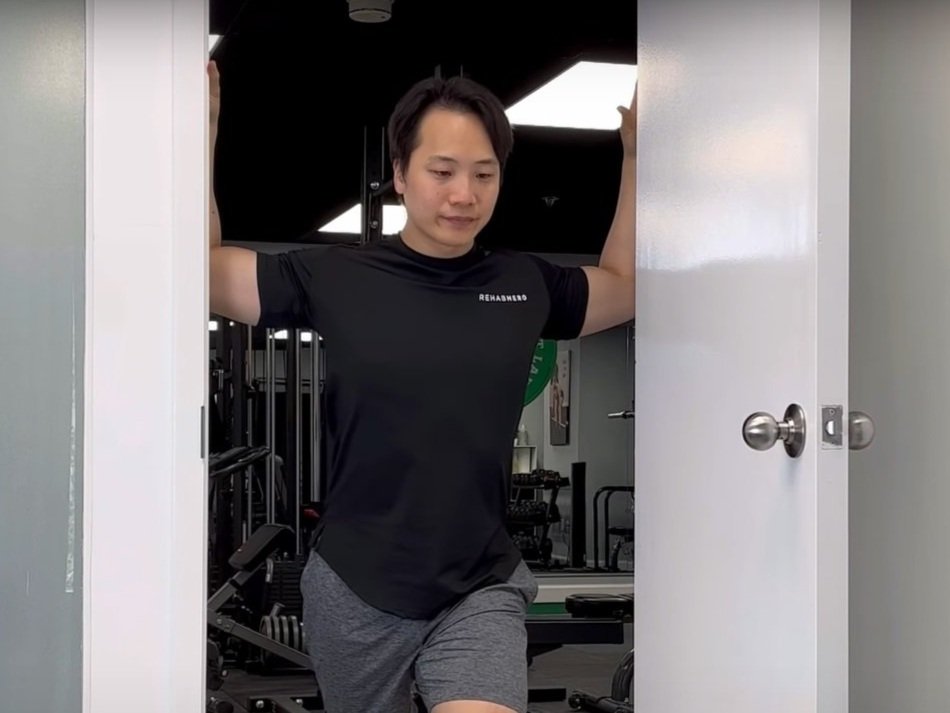
Stand in a doorway with hands on the frame at shoulder height. Step forward with one foot, keeping your spine neutral. Feel a stretch across your chest. Hold 20 seconds and repeat 3 times.
For upper chest, raise hands slightly above shoulder level. For lower chest, place hands lower on the frame.
Loosen Tight Hip Flexors
Sitting shortens the iliopsoas and rectus femoris, tilting the pelvis forward and exaggerating the lower back curve.
Half-Kneeling Hip Flexor Stretch
Kneel on one knee with your front foot flat and knee at 90 degrees. Push hips forward while keeping your torso upright. Feel the stretch in the front of your hip on the kneeling side. Hold 20 to 30 seconds per side, 3 sets total.
Do this daily, especially after long sitting periods.
Correct Forward Head Posture
For every inch your head juts forward, your neck bears 10 extra pounds of load. Fix this with targeted exercises.
Chin Tuck Exercise
Sit tall and gently tuck your chin straight down toward your throat, not forward. Imagine making a double chin. Hold 3 to 5 seconds and repeat 10 to 15 times. Do 2 to 3 sets daily.
This activates deep neck flexors and reduces strain on the upper traps and suboccipital muscles.
Upper Trapezius Stretch
Tilt your ear toward your shoulder. Gently deepen the stretch with the opposite hand. Hold 20 seconds per side, 3 sets total.
Break Static Sitting Every 30 Minutes
Your body is not built to sit still for hours. Static postures fatigue muscles and stiffen joints.
Use the 50/10 Rule
Follow the 50/10 rule: sit for 50 minutes, then move for 10. Stand, walk, stretch, or reset your posture. This rhythm prevents postural collapse and boosts circulation throughout your workday.
Try the 20-20-20 Rule for Neck and Eyes
Every 20 minutes, look at something 20 feet away for 20 seconds. This reduces eye strain and interrupts the forward-head posture caused by screen focus. Pair it with a quick shoulder roll or neck tilt for added benefit.
Add Micro-Breaks Hourly
Even 30 seconds of movement helps. Every 20 to 30 minutes, roll your shoulders, pump your ankles to boost blood flow, stand and do 5 chin tucks, and stretch wrists and fingers.
These tiny resets prevent stiffness and keep your posture sharp throughout the day.
Use Supportive Equipment Wisely

The right equipment can make or break your posture efforts. Choose wisely and avoid trendy gimmicks.
Choose an Ergonomic Chair with Adjustability
Look for a chair with adjustable seat height and depth, a contoured backrest with lumbar support, padded and adjustable armrests, and breathable fabric to prevent overheating.
If your chair lacks support, add a lumbar roll. A rolled towel works in a pinch.
Consider a Sit-Stand Desk
Standing intermittently reduces spinal compression and encourages movement. Use a sit-stand desk or riser, aiming for a 1:1 ratio, such as 30 minutes sitting and 30 minutes standing. When standing, wear supportive shoes and use an anti-fatigue mat.
Avoid standing too long. Overuse can cause foot, knee, or lower back pain.
Avoid Exercise Balls and Kneeling Chairs
Despite their popularity, exercise balls lack back support and lead to fatigue and slumping after 20 minutes. Kneeling chairs shift weight forward and may help short-term but can cause shin discomfort and are not suitable for prolonged use.
Stick to adjustable office chairs for all-day support.
Recognize When to Seek Professional Help
Do not ignore persistent symptoms. See a physiotherapist or chiropractor if you have chronic neck, shoulder, or back pain, numbness, tingling, or weakness in arms or hands, radiating leg pain indicating possible sciatica, frequent headaches from screen work, or visible hunching or spinal curvature.
These may indicate nerve compression, muscle imbalances, or structural changes needing expert care.
Get a Posture Assessment
A professional can analyze your seated and standing posture, identify tight or weak muscles, provide manual therapy and personalized exercises, and optimize your ergonomic setup.
Physical therapy is highly effective for reversing long-term postural damage.
Build Long-Term Posture Habits
Sustainable results come from consistent habit formation, not quick fixes.
Start Small and Stack Habits
Trying to fix everything at once leads to burnout. Begin with one change. On day 1, keep your feet flat. On day 3, add chin tucks every hour. On day 5, raise your monitor to eye level.
Use habit stacking. Pair posture checks with existing routines, such as after sending an email, do 5 scapular pinches.
Use Tech as a Posture Coach
Set phone or smartwatch reminders every 30 minutes to check your posture. Use apps like Posture Reminder, Stand Up, or Apple Watch stand prompts to stay on track.
Place visual cues, sticky notes with shoulders back or sit on sit bones, on your monitor as constant reminders.
Invest in Your Workspace
An ergonomic chair or sit-stand desk is a long-term investment in health. Even small upgrades, like a lumbar cushion, monitor riser, or footrest, can make a big difference, especially for remote workers using dining tables or couches.
Frequently Asked Questions About Stopping Desk Slouching
How long does it take to fix slouching posture?
Most people notice improvement within 2 to 4 weeks of consistent practice. However, fully retraining your muscles and breaking long-held habits can take 2 to 3 months. The key is consistency with daily exercises, ergonomic adjustments, and movement breaks.
Does sitting up straight hurt at first?
Yes, it is normal to feel discomfort initially. Your body has adapted to slouched positions, so sitting up straight engages different muscles. This discomfort typically resolves within 1 to 2 weeks as your postural muscles strengthen.
Are exercise balls better than office chairs for posture?
No. Exercise balls lack back support and lead to fatigue and slumping after about 20 minutes. They can be useful for short core-strengthening sessions but are not recommended for all-day seating. A properly adjusted ergonomic office chair provides better long-term support.
How often should I take breaks from sitting?
Take a movement break every 30 to 60 minutes. Use the 50/10 rule: sit for 50 minutes, then move for 10. Even brief 30-second micro-breaks every 20 to 30 minutes help prevent stiffness and maintain good posture.
Can I fix forward head posture with exercises alone?
Exercises help, but you must also address the root causes. Fix your monitor height, strengthen your neck extensors, and stretch tight chest muscles. Combining ergonomic changes with targeted exercises produces the best results for correcting forward head posture.
What is the best chair for preventing slouching?
Look for an ergonomic chair with adjustable seat height, adjustable lumbar support, a contoured backrest, adjustable armrests, and breathable fabric. The chair should allow your feet to rest flat on the floor with knees at 90 degrees. If your current chair lacks lumbar support, add a lumbar roll or cushion.
Key Takeaways for Stopping Slouching at Your Desk

Slouching is not a personal failure. It is a symptom of modern work environments that demand long hours in static positions. But with consistent adjustments to your ergonomics, movement habits, and muscle strength, you can retrain your body to sit with ease and alignment.
The most effective approach combines three elements. First, optimize your workspace with proper chair height, monitor placement, and keyboard positioning. Second, strengthen weak postural muscles through daily core activation, scapular pinches, and planks. Third, break static sitting with movement every 30 minutes and regular stretching.
Start today with one small change. Perhaps it is simply keeping your feet flat on the floor or raising your monitor to eye level. Build from there, and your spine will thank you for years to come.





