
Dust builds up on desks faster than most people realize, especially in homes near windows, with pets, or during high-pollen seasons. Left unchecked, it doesn’t just make your workspace look messy; it can affect your health, damage electronics, and reduce productivity. The good news? Cleaning dust from your desk doesn’t require expensive tools or harsh chemicals.
This guide covers everything from essential tools and surface-specific methods to tackling dust trapped under glass tops and preventing future buildup. You’ll learn the exact techniques that keep desks spotless and allergen-free without damaging your equipment.
Essential Tools for Dust Removal

Why Microfiber Cloths Work Best
Microfiber cloths are the gold standard for dust removal because their ultra-fine fibers trap dust instead of pushing it around. They’re safe on delicate surfaces like monitors, keyboards, and glossy finishes. For best results, lightly dampen the cloth with cold water to help clump dust particles for easier pickup.
Avoid using paper towels, which can scratch screens and leave lint behind. Wash microfiber cloths regularly to maintain effectiveness, and keep one on your desk for quick daily wipe-downs. This simple habit prevents dust from accumulating into thick layers that are harder to remove.
Blowing Out Hidden Dust
Air blowers and compressed air cans are essential for cleaning hard-to-reach areas. Use them to clear dust from keyboard gaps, USB ports, and the space between your monitor and desk. Electronic air blowers like the Dartifact offer reusable, powerful bursts without propellant residue.
When cleaning under a glass-top desk, even a small gap allows airflow to dislodge trapped dust. Work from multiple angles and use short bursts to avoid damaging sensitive components. This method works especially well for keyboards and small electronics where dust settles between keys.
Vacuuming the Desk Perimeter
Stick vacuums make quick work of dust bunnies under and around your desk. High-suction models like Kirby or Electrolux are effective, but avoid attachments with stiff bristles because they can scratch plastic or painted surfaces. Use a soft brush or crevice tool instead.
Never vacuum directly over electronics unless using a device specifically designed for keyboard cleaning. Focus on floor edges, chair wheels, and baseboards to reduce overall dust circulation. Regular perimeter vacuuming significantly decreases the amount of dust that settles on your desk surface.
Quick Dusting with Swiffer Dusters
Swiffer Dusters are convenient for dry dusting without liquids. The unscented version is safest near computers because scented wipes may leave behind sticky residues that attract more dust or harm electronics. These disposable dusters work well on flat, smooth surfaces but struggle with textured materials.
While costlier over time than reusable cloths, they’re ideal for fast cleanups when you don’t want to wash a rag. Keep one handy for daily touch-ups, especially after cooking or when pets have been near your workspace.
DIY Cleaning Hacks
When specialty tools aren’t available, improvise with common household items. Wrap a spoon in a narrow cotton cloth and slide it between your desk and a protective glass top to pull out trapped dust. This spoon-and-cloth technique is surprisingly effective for reaching tight spaces.
Another popular hack involves wrapping a Clorox wipe around a credit card and running it along the edges where grime collects. Old cotton towels, especially those washed multiple times, are excellent for damp wiping without lint. These low-cost solutions work well when you’re in a pinch.
Cleaning Different Desk Surface Types
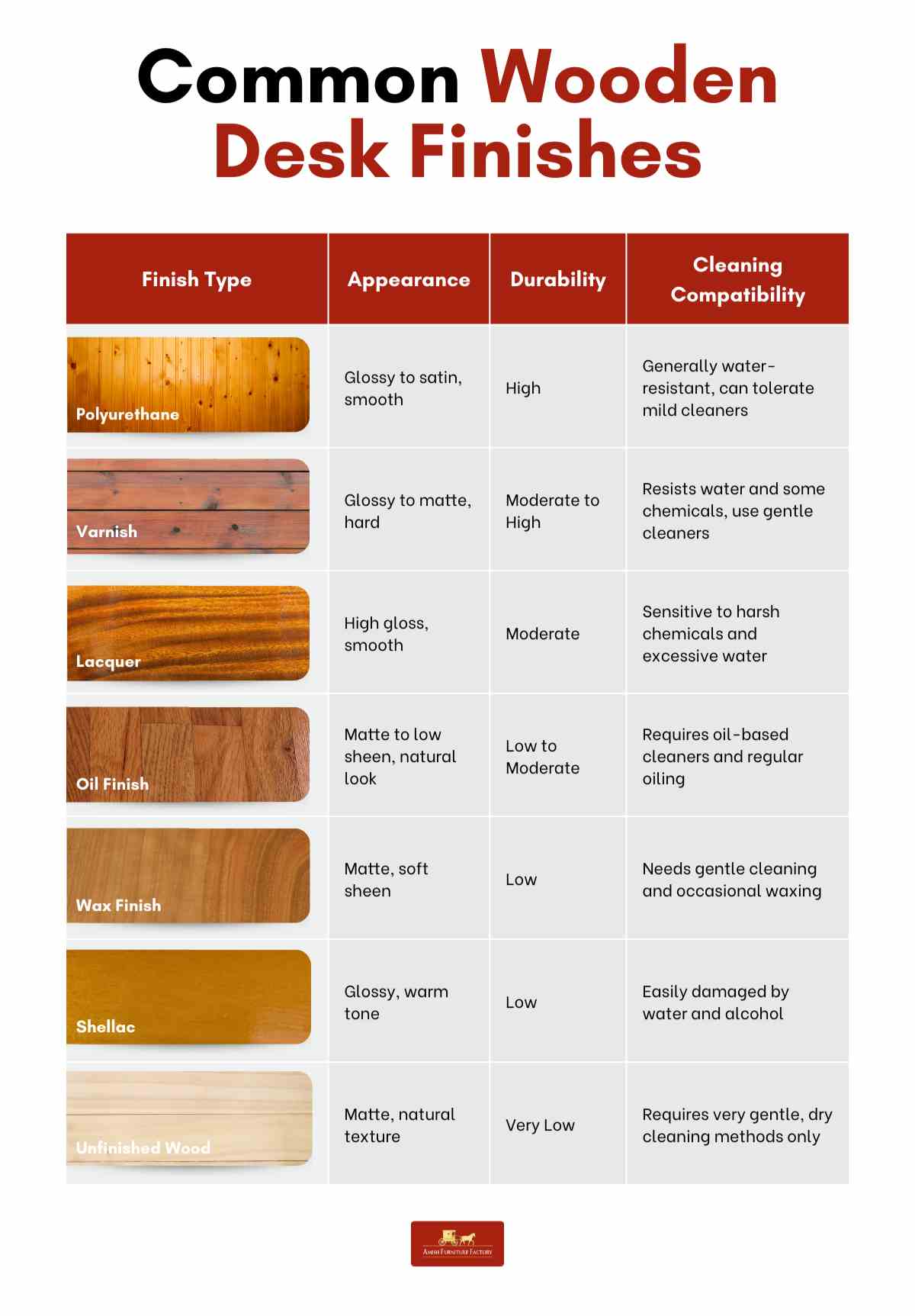
Maintaining Wooden Desks Safely
Wooden desks need gentle care to preserve their finish. For routine dusting, use a slightly damp microfiber cloth with plain water to avoid chemical exposure linked to long-term health risks. This simple approach removes dust effectively without damaging the wood.
For deeper cleaning or shine, apply Pledge or Mr. Sheen to a cloth and wipe in the direction of the grain. These polishes enhance appearance and repel light dust. Avoid overspraying near electronics, and never use ammonia-based cleaners like Windex on wood because they can strip finishes over time.
Shining Glass-Top Desks Without Streaks
Glass-top desks are sleek but show every speck of dust and fingerprint. Use Windex or another ammonia-based glass cleaner applied to a microfiber cloth, not sprayed directly, to prevent liquid from seeping under the edges. Wipe in circular motions for a streak-free finish.
To clean the perimeter where glass meets the desk, wrap a disinfecting wipe around a credit card and slide it around the entire edge. This technique captures hidden dust and prevents buildup over time. Regular edge cleaning saves you from having to lift the glass later.
Protecting Metal and Plastic Surfaces
Aluminum parts like Apple keyboards respond well to Mr. Sheen or a damp microfiber cloth for shine without scratching. For plastic surfaces, especially anti-glare or matte finishes, avoid paper towels and abrasive cleaners entirely.
Stick to soft cloths and mild soaps. Scratches from rough materials degrade appearance and make future cleaning harder. Always test any cleaner on a small, hidden area first to ensure compatibility with your specific surface type.
Removing Dust Under Glass Tops
When It’s Safe to Lift Glass
If dust has settled between your desk and a protective glass top, lifting the glass may seem like the fastest fix, but proceed with caution. Standard 6mm glass isn’t designed to support heavy loads like monitors or computers when lifted at one edge. Attempting to clean under it while weight is applied risks cracking.
The safest method involves removing all equipment first, then gently lifting one side and inserting shims to hold the gap open. Even better, remove the glass completely for a thorough wipe-down. This approach takes more time but eliminates the risk of damage.
Blowing Dust Through Gaps
You don’t always need to lift the glass. If rubber bumpers or spacers create even a tiny gap, use compressed air or an electronic blower to force dust out. Position the nozzle at one corner and blow diagonally across the surface. Repeat from different angles to cover the full area.
This non-invasive method works best with frequent maintenance and prevents the need for full disassembly. The key is catching dust before it accumulates into thick layers that are harder to dislodge.
Manual Cleaning Without Removal
For stubborn dust trapped under glass, try the spoon-and-cloth technique. Wrap a long, narrow microfiber strip around the back of a spoon and insert it into the gap. Move the spoon from right to left, transferring dust across the surface until the entire area is clean.
Pair this with edge cleaning using a wipe-wrapped credit card for complete results without removing the glass. It’s slow but effective, and you avoid the risk of cracking or damaging the glass panel.
Cleaning Electronics and Screens Safely

Wiping Screens Without Damage
Computer screens collect dust and oils from fingers. Use a dry microfiber cloth first to remove loose particles. For smudges, dampen the cloth with water or a mix of 70% isopropyl alcohol and water. Never spray liquid directly; apply only to the cloth.
Avoid ammonia-based cleaners like Windex on anti-glare screens because they degrade coatings over time. iKlear is a premium alternative praised for cutting grease, but it’s overkill for general desk cleaning. For most users, water or rubbing alcohol does the job perfectly.
Deep-Cleaning Keyboards and Mice
Keyboards trap dust, crumbs, and skin cells. Turn the keyboard upside down and use an air blower to dislodge debris. For surface grime, wipe between keys with a cotton swab or a cloth-wrapped toothpick.
Externally, use a microfiber cloth dampened with diluted Dawn dish soap or rubbing alcohol. Let it dry completely before reconnecting. For mice, focus on optical sensors and scroll wheels, which attract dust and affect performance. Regular keyboard cleaning extends its lifespan significantly.
Preventing Dust Buildup Long-Term
Establishing a Weekly Cleaning Routine
Dust is inevitable, but consistency keeps it under control. Aim for a weekly dry wipe-down with a microfiber cloth and a deep clean every two to four weeks. Users who clean regularly report cleaner air, fewer allergies, and better device performance.
Keep a cleaning kit nearby, including a cloth, small bottle of cleaner, and compressed air, to make the process fast and painless. Having everything ready removes the excuse of not having time to clean.
Reducing Airborne Dust
An air purifier significantly reduces dust accumulation, especially in high-pollen areas or near busy streets. Place one near your desk to filter allergens and fine particles. During spring or dry seasons, keep windows closed to prevent outdoor dust and yellow film buildup, particularly on white or light-colored desks.
This environmental control method works alongside regular cleaning to keep your desk dust-free for longer periods between cleanings.
Changing Workspace Habits
Simple behavioral changes make a big difference. Enforce a no food or drink rule at your desk to avoid sticky residues that trap dust. Use trays or coasters when exceptions occur.
Keep paper organized because while stacks can hide dust, they also block access for cleaning. Instead, use drawers or digital files to maintain a clear, easy-to-clean surface. These habits reduce the frequency and intensity of deep cleaning needed.
Recommended Products Summary
| Product | Best For | Key Tips |
|---|---|---|
| Microfiber cloth | All surfaces | Wash after 5-10 uses; never use fabric softener |
| Windex | Glass tops | Spray on cloth, not surface; avoid electronics |
| Pledge / Mr. Sheen | Wood desks | Use sparingly; adds shine and light dust resistance |
| Unscented Swiffer | Quick dry dusting | Great for daily use; dispose after one session |
| Compressed air | Keyboards, gaps | Hold can upright; use short bursts |
| Rubbing alcohol (70%) | Screens, disinfecting | Safe alternative to LCD wipes |
| Clorox wipe + credit card | Edges and corners | Wrap tightly for precision cleaning |
| Stick vacuum (soft brush) | Floor and baseboards | Avoid bristle contact with plastic |
Safety Best Practices
Avoiding Common Cleaning Mistakes
Never spray cleaners directly onto your desk or electronics because this prevents liquid from seeping into seams, ports, or wood grain. Always apply to the cloth first. Use cold water only, as hot water can warp surfaces or damage adhesives.
Dry immediately after damp wiping to prevent water spots or swelling, especially on wood. These small precautions prevent costly damage and keep your desk looking new longer.
Protecting Your Health
Excessive use of chemical cleaners is tied to respiratory issues and long-term health risks. Opt for water and microfiber for routine cleaning. When using ammonia-based products like Windex, ensure good ventilation by opening windows or using a fan.
Avoid abrasive tools like steel wool, stiff brushes, or rough sponges that can scratch or dull finishes. Your health and your desk both benefit from gentler cleaning approaches.
Testing Products First
Before applying any new product, test it on a small, inconspicuous area. This is crucial for wood, plastic, and matte finishes that may react poorly to certain chemicals. Even trusted brands can vary by formulation, so verify compatibility first.
Waiting 24 hours after testing ensures you see any adverse reactions before committing to full cleaning. This minimal effort prevents permanent damage to expensive furniture or equipment.
Real-World Tips from Frequent Cleaners
One user cleans their white desk and Wacom tablet daily during pollen season using a multi-surface cleaner and disposable cloths. Others keep a microfiber cloth on hand for instant wipe-downs after meals or coffee spills. A stick vacuum owner says the investment was worth it for effortless weekly cleaning.
While some joke about leaving crumbs and dust for a lived-in look, most agree that a clean desk boosts focus, extends device life, and feels more professional. The consensus is clear: consistency and the right tools make desk cleaning effortless.
Key Takeaways for a Dust-Free Desk
Cleaning dust from your desk is simple when you know the right methods. Use a microfiber cloth with water for daily maintenance. Apply surface-specific products like Pledge for wood, Windex on cloth for glass, and rubbing alcohol for screens. Tackle hidden dust with compressed air or the spoon-and-cloth trick.
Prevent future buildup with an air purifier, closed windows during high-pollen seasons, and a no-food policy at your desk. Avoid paper towels on delicate surfaces, never spray liquids directly, and skip bristled vacuum attachments on plastic. With these strategies, your desk stays clean, safe, and ready for work.
Frequently Asked Questions About Cleaning Dust from Desk
How often should I dust my desk?
Weekly dusting is recommended for most workspaces. If you live in a high-pollen area, have pets, or work near open windows, consider dusting two to three times per week. Daily quick wipe-downs take less than a minute and prevent thick dust layers from forming.
What is the best cloth for dusting a desk?
Microfiber cloths are the best choice because their ultra-fine fibers trap dust rather than pushing it around. They’re reusable, washable, and safe on all desk surfaces including screens, wood, and glass. Avoid paper towels which leave lint and can scratch delicate surfaces.
Can I use Windex on my desk?
Windex is safe for glass-top desks when applied to a cloth rather than sprayed directly. Avoid using Windex on wooden desks or screens with anti-glare coatings, as ammonia can damage these surfaces. For wood, use Pledge or Mr. Sheen instead.
How do I clean dust under a glass desk top without removing it?
Use compressed air aimed into any gaps around the edges to blow dust out. Alternatively, slide a cloth-wrapped spoon or a credit card wrapped in a cleaning wipe along the edges to pull dust toward you. This method works well for regular maintenance.
Does an air purifier help reduce desk dust?
Yes, air purifiers significantly reduce dust accumulation by filtering airborne particles before they settle on surfaces. Place one near your desk for best results, especially in high-pollen seasons or dusty environments. This investment reduces cleaning frequency over time.





